DRAP Rules for Pharmacies in Pakistan: A Practical Checklist
What DRAP regulates, what your province licenses and inspects, and the day-to-day records a pharmacy or medical store keeps: purchases, batches and expiry, prescriptions, controlled medicines, storage and recalls.
- Published
- Reading time
- 5 min read

Running a pharmacy in Pakistan means answering to two levels of government. The federal regulator, DRAP, decides which medicines may be sold and how they are made, priced and recalled. Your province licenses your premises, sets the qualified-person rules and sends the inspector. Most of the day-to-day work of staying compliant is not legal at all: it is keeping clean records of what you bought, what you sold and what you threw away.
This checklist is written for owners and pharmacists of retail pharmacies and medical stores. It is not legal advice, and it does not quote fees or penalties. Where a rule matters, it points to the authority to check with.
Who does what
DRAP (Drug Regulatory Authority of Pakistan) was set up under the DRAP Act, 2012 and works with the Drugs Act, 1976. Drug laws for pharmacies covers the licence, the counter rules and the penalties in one place. Its work that touches a pharmacy counter includes:
- Registration of medicines: only registered products may be sold.
- Pricing of medicines: the price printed on the pack is set under the federal pricing rules, and you should not sell above it.
- Recalls and alerts: DRAP publishes recall alerts for products found substandard, misbranded or otherwise unsafe, and tells pharmacies what to do with remaining stock.
Your province handles the shop itself. In Punjab, for example, the health department's provincial DRAP unit lists sale and distribution licensing, inspections, sampling and testing, and the issuance and cancellation of licences for pharmacies, medical stores and distributors among its functions. Other provinces have their own drug control offices with similar roles.
Provinces issue different kinds of drug sale licence (for example, for a pharmacy or a medical store), each with its own requirement for a qualified person on the premises. Which licence you need, and who must be present when you are open, is a question for your provincial office.
The records that keep you safe
Inspectors look at paper and stock, not intentions. These are the records most pharmacies keep:
| Record | What it shows |
|---|---|
| Purchase invoices | Every medicine came from a licensed supplier, with batch and expiry |
| Batch and expiry by item | What you hold, from which batch, expiring when |
| Prescriptions | Prescription-only medicines were sold against a prescription |
| Controlled medicines register | Each sale of a controlled or narcotic medicine, with the patient and prescriber |
| Expired and returned stock | What was removed from sale and where it went |
| Storage log | Fridge temperatures for medicines that need cold storage |
A daily and monthly routine
Step 1: Receive stock with batch and expiry
Check each delivery against the invoice. Record batch number and expiry for every line, not just the product name.
Step 2: Sell the oldest batch first
Put near-expiry stock in front (first expiry, first out) so it sells before it expires.
Step 3: Ask for the prescription
For prescription-only medicines, see the prescription and keep a record. For controlled medicines, write the register entry at the time of sale.
Step 4: Log the fridge
Note the temperature at opening and closing for insulin, vaccines and other cold-chain items.
Step 5: Check expiry every month
Pull everything expiring in the coming months, return what the supplier will take back, and quarantine what is already expired.
Step 6: Read recall alerts
When DRAP or your province issues an alert, check your stock for the named batch, stop sale and return it as instructed.
Where pharmacies usually slip
- Batch numbers missing from purchases. Without them, you cannot answer a recall alert quickly. You end up pulling every pack of a product instead of the one batch named.
- Loose strips with no trail. When you sell by the strip or tablet, the pack's batch still needs to be traceable.
- Expired stock on the shelf. One expired pack found on the shelf during an inspection is hard to explain. A monthly expiry sweep prevents it.
- Register written later. Controlled-medicine entries made at the end of the day from memory are the ones that do not match.
- Selling above the printed price. Charge what the pack says.
- Unlicensed supply. Cheaper stock from an unlicensed source is a risk to patients and to your licence.
How software helps
A pharmacy POS will not get you a licence, but it makes the records above a by-product of normal work. In Nafaa's pharmacy setup:
- Each medicine carries its formula (salt), schedule and whether it needs a prescription. Substitutes with the same salt are one search away.
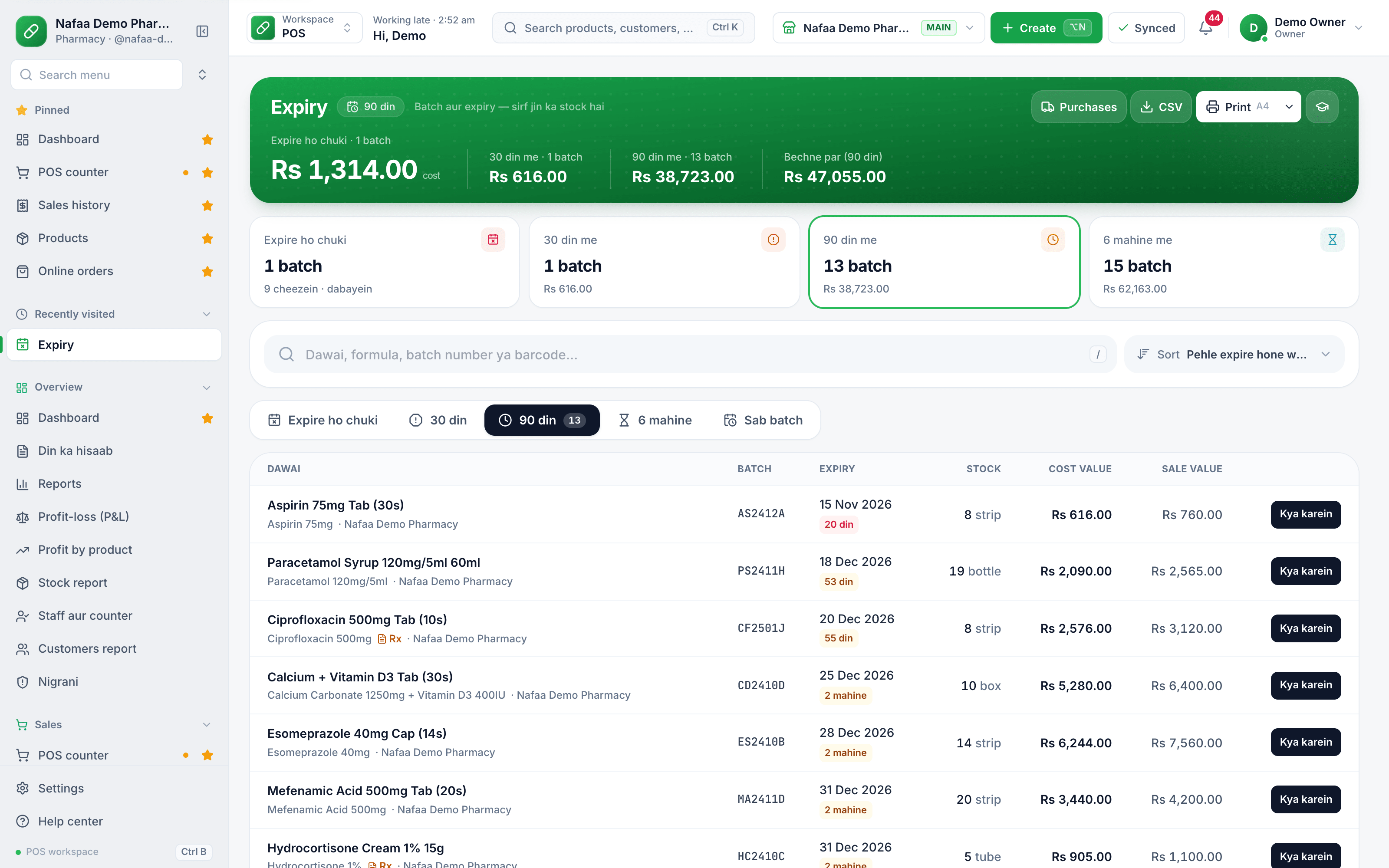
- Stock is received with batch and expiry, and the expiry screen lists what is close to expiring so you can act early.
- At the counter, a controlled medicine prompts a register entry before the sale is completed, and the narcotic register keeps those entries in one place.
- Prescriptions and doctors are saved, so repeat patients are quicker to serve.
- A cold-chain log records fridge temperatures.
- Strips, boxes and loose tablets are sold from the same stock, so a loose sale still reduces the right item.
Batches close to expiry, in one list
The expiry screen groups batches due in the next 30 and 90 days, with batch number, expiry date, stock and value, so the monthly sweep starts from a list instead of the shelf.
Before an inspection
Keep licences and the qualified person's documents displayed or at hand, the controlled register up to date, expired stock separated and labelled, and the last few months of purchase invoices filed. If your records live in software, make sure whoever is on duty knows how to open the batch, expiry and register screens.
Official sources
- Drug Regulatory Authority of Pakistan (DRAP) · Drug Regulatory Authority of Pakistan · Accessed
- DRAP recall alerts · Drug Regulatory Authority of Pakistan · Accessed
- PMU Provincial DRAP: licensing, inspections and pharmacy management in Punjab · Primary & Secondary Healthcare Department, Punjab · Accessed

