Selling Online in Pakistan: A Guide for Shop Owners
How an existing shop can start selling online in Pakistan: choosing between WhatsApp, social media, your own website and marketplaces, handling cash on delivery and couriers, cutting returned parcels, taking payments, and keeping shop and online stock in step.
- Published
- Reading time
- 4 min read
Many shops already sell online without calling it that. A customer sends a WhatsApp message, the owner sends photos, the customer picks one, and a rider takes it across the city. The step from there to a proper online business is not a big website; it is handling orders, deliveries, payments and stock in a way that does not fall apart when orders grow.
Choose your channels
Start with one or two channels, and add more once orders are running smoothly.
| Channel | Good for | Watch for |
|---|---|---|
| Existing customers, repeat orders, local delivery | Orders scattered across chats; hard to track | |
| Facebook and Instagram | Clothing, cosmetics, gifts, anything visual | Many enquiries, fewer confirmed orders |
| Your own website | A brand customers search for; full control of prices | You bring the visitors; needs product photos and upkeep |
| Shopify or WooCommerce store | A ready online store with themes and apps | Monthly costs and setup time |
| Marketplaces | Reaching buyers who do not know you yet | Commission and marketplace rules |
| Food delivery apps | Restaurants and bakeries | Commission; menu and prices to keep in sync |
Whatever the channel, the work behind it is the same: take the order, confirm it, pack it, hand it to a courier or rider, collect the money and handle returns. The guide to selling online takes each step in order.
One stock for the shop and online
Cash on delivery and couriers
Most online orders in Pakistan are still paid cash on delivery (COD). The courier collects the money and pays it to you later, after deducting charges. That means:
- Your money sits with the courier for some days. Track how much each courier holds for you and when it was paid.
- Some parcels come back. A customer who ordered on impulse refuses the parcel, and you pay delivery both ways. This is called RTO (return to origin).
- Choose couriers by your cities. Compare couriers on delivery success and speed in the cities you ship to most, not only on price.
Cutting returned parcels
- Confirm every order by call or WhatsApp before booking the courier. A two-minute confirmation stops many refusals.
- Ask for advance payment on high-value or custom items, or a delivery charge in advance.
- Keep a block list of numbers that refuse parcels repeatedly.
- Write a clear description and size guide, so what arrives is what the customer expected.
- Watch return rates by city and courier, and change the courier where returns are high.
Set up your first online sales
Step 1: Pick your best 30 products
Start with items that sell well in the shop, photograph well and are easy to ship.
Step 2: Take clean photos
Plain background, good light, the item from two or three angles, and the size or weight in the description.
Step 3: Decide prices and delivery charges
Include packaging and courier costs. Decide whether delivery is free above a certain order value.
Step 4: Open accounts with one or two couriers
Get their rates, COD payment schedule and pickup times in writing.
Step 5: Write a returns and exchange policy
Put it on your page and on the invoice in the parcel.
Step 6: Process every order the same way
Confirm, pack, book, ship, track, collect. Every order, every day.
Online orders next to the shop counter
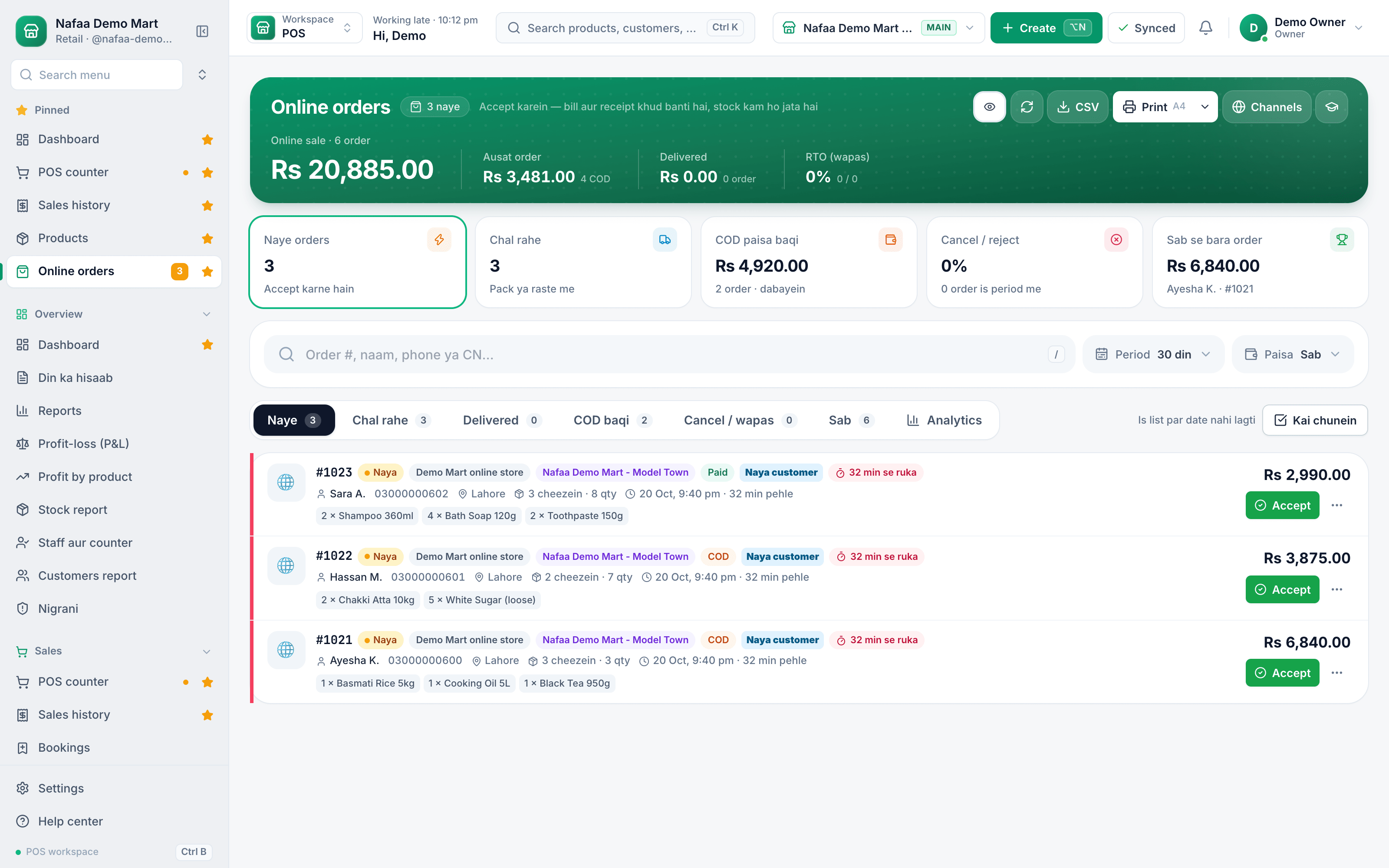
Website orders arrive with status, customer area and total, and a new order pops up on the counter with Accept and View buttons, so nothing waits in an inbox.
Taking payments online
Besides COD, customers in Pakistan pay by bank transfer, mobile wallets such as JazzCash and Easypaisa, Raast, and cards through a payment gateway. Prepaid orders cut returns sharply, so many sellers offer a small discount or free delivery for paying in advance. Whatever you accept, match each payment to its order the same day.
Keep shop and online stock together
The most common online complaint is "out of stock after I paid". It happens when the shop sells the last piece at the counter while the website still shows it. Use one stock for both: when an item sells in the shop, the online count drops, and when an online order comes in, the shop sees it at once.
Customers worth keeping
Online buyers who order twice are worth much more than new ones. Keep a list of repeat customers and those who have not ordered for a while, and send them a personal WhatsApp message when new stock arrives. See our WhatsApp templates.
How Nafaa helps
Nafaa connects your own website, a Shopify store or a WooCommerce store to the same stock and orders as your shop, and online orders appear next to the counter with an alert. COD and courier screens show parcels on the road, COD held by each courier and returns, with airway bills printed for connected couriers such as PostEx and Leopards. Online reports break down returns by city, channel and courier, a block list stops repeat refusers, restaurants can take Foodpanda orders in the same place, and the online customers screen groups buyers into repeat, new and gone-quiet lists with a broadcast message ready to copy.
