- Fact-checked
- Updated
Compare
Nafaa vs Udhaar Book (now Rupin)
Udhaar Book, which its App Store listing says is now called Rupin, is a free khata, cash book and payments app with a business wallet, mobile load and bill payments. Nafaa is a POS-first system for running a counter, stock and udhaar together. This page compares them and says when Udhaar Book is the better pick.
Which one should you choose?
Udhaar Book, which its App Store listing says is now called Rupin, is a free khata, cash book and payments app with a business wallet, mobile load and bill payments. Nafaa is a POS-first system for running a counter, stock and udhaar together. This page compares them and says when Udhaar Book is the better pick.
Roman Urdu mein
Udhaar Book (ab Rupin) muft khata aur paise lene dene ke liye acha hai. Agar counter par roz bohat bill bante hain aur Stock, udhaar aur galla ek saath chalna chahiye, to Nafaa behtar hai.
Key facts
- Short answer
- Udhaar Book for a free khata and a business wallet; Nafaa for a fast counter where udhaar, stock and cash stay in step.
- Choose Udhaar Book if
- You want to start free, collect money by wallet or bank transfer into one app, and sell load or bill payments.
- Choose Nafaa if
- You bill many customers a day with a scanner and printer, and need stock, staff controls and branch reports.
- Name change
- The App Store and Google Play listings read "Udhaar Book is now Rupin"; accounts and records stay the same.
- Nafaa price
- Paid plans from Rs 1,500 a month, after a 7-day free trial
At a glance
Nafaa
- Price
- Paid plans from Rs 1,500 a month See pricing
- Free trial
- Free
Udhaar Book
- Website
- udhaar.pk
Written by the Nafaa team. Competitor details come from their own pages and are dated; tell us if something has changed and we will update it. Last checked: .
What each one is
Udhaar Book started as a digital khata. Its website, udhaar.pk, describes a credit book with free reminders and invoices, a cash book, a staff book for attendance, overtime, advances and salaries, a stock book, an invoice book and a Sale POS. It also lets you request money by bank transfer (IBFT) or wallet, and earn commission by selling mobile load (up to 2%), paying customers' utility bills and selling vouchers (4%). The site calls the app "100% free and safe".
The App Store and Google Play listings, both titled "Rupin (formerly Udhaar Book)", now read "Udhaar Book is now Rupin" and say accounts and records stay the same. Under the new name the app adds a business wallet that receives payments through JazzCash, Easypaisa, Raast and bank transfer. Rupin's website says it "operates under the State Bank of Pakistan's EMI Pilot framework", and the Google Play listing adds that the final EMI licence is pending. It also lists GST and sales tax invoices, a POS that prints receipts, inventory with warehouses, and payroll.
Nafaa is built the other way round. The bill at the counter comes first. Scanning items, choosing how the customer pays and printing the receipt also reduces stock, posts any udhaar to the khata and records the money in the right drawer or account. Purchasing, suppliers, staff roles, expenses, branches and reports all read from those bills.
Nafaa and Udhaar Book side by side
| Feature | Nafaa | Udhaar Book (Rupin) |
|---|---|---|
| Starting point | The bill at the counter, with stock, khata and cash updated from it | The khata and cash book, now with a business wallet |
| Point of sale | Barcode, search and quick keys; receipt printer, cash drawer and customer display | Sale POS: several items per sale, item Discounts, cash or udhaar, shareable receipts |
| Stock | Per branch, with variants, units, batches, transfers and stock counts | Stock Book with units, barcodes, expiry dates, low-stock alerts; auto update on sale |
| Udhaar reminders | WhatsApp reminders from the khata, sorted by age of balance | Free automatic reminders with the customer ledger |
| Receiving money | Records cash, card, wallets and bank; shows your own Raast, JazzCash or Easypaisa QR with the amount | Wallet receives JazzCash, Easypaisa, Raast and IBFT; payment links |
| Extra services | Not offered | Mobile load, bill payments and vouchers with commission |
| Staff | Logins with roles and permissions; attendance and payroll | Attendance, overtime, advances and salaries |
| Without internet | Counter keeps billing; sales sync later | Not stated on the pages checked |
| Devices | Android and iPhone app, browser on any device, Windows app | Android, iOS and a web version |
| Price | Paid plans from Rs 1,500 a month after a 7-day free trial | Described as "100% free"; both app store listings show it as free |
Sources
- Udhaar Book home page (features, payments, earn money) · Udhaar Book · Accessed
- Udhaar Book Sale POS page · Udhaar Book · Accessed
- Udhaar Book Stock Book page (inventory, platforms) · Udhaar Book · Accessed
- Rupin (formerly Udhaar Book) on the App Store · Apple App Store · Accessed
- Rupin (formerly Udhaar Book) on Google Play · Google Play · Accessed
- Rupin home page (features, SBP EMI Pilot framework) · Rupin · Accessed
Checked on
When Udhaar Book is the better choice
- Cost is the deciding factor. Udhaar Book describes itself as free. Nafaa is paid after the trial.
- You want one place to receive money. The Rupin wallet takes JazzCash, Easypaisa, Raast and bank transfers into a business account. Nafaa shows your own QR on the bill and records the payment, but the money goes to your existing wallet or bank, not to a Nafaa account.
- You sell mobile load and bill payments. These earn commission inside the Udhaar Book app. Nafaa does not offer them.
- Most of your work is recording entries, not billing a queue. A supplier, a tailor or a small distributor may never need a scanner and printer.
When Nafaa is the better choice
- Your counter is busy. Nafaa is built for speed: keyboard shortcuts, barcode scanning, quick keys for loose items, and a big button that takes cash and prints in one step. See POS.
- Udhaar should come from the bill. Pick udhaar as the payment and the customer's khata shows exactly which items were taken. A credit limit stops a bill that would go past the agreed amount unless a manager approves it with a PIN.
- You want the galla to balance. Opening float, cash taken out for expenses, and a closing count against the expected amount, for each counter and shift.
- Staff need limits. Roles control who can give a Discount, make a refund, or see Cost and Profit. See Staff.
- Power and internet cut out. The counter keeps billing and syncs later. See Offline POS.
- You have, or plan, a second branch. Each branch keeps its own stock, and head office sees them side by side. See Multi-Branch.
Built for the counter first
Items, the bill total and every payment method on one screen, so the cashier can serve the next customer quickly.
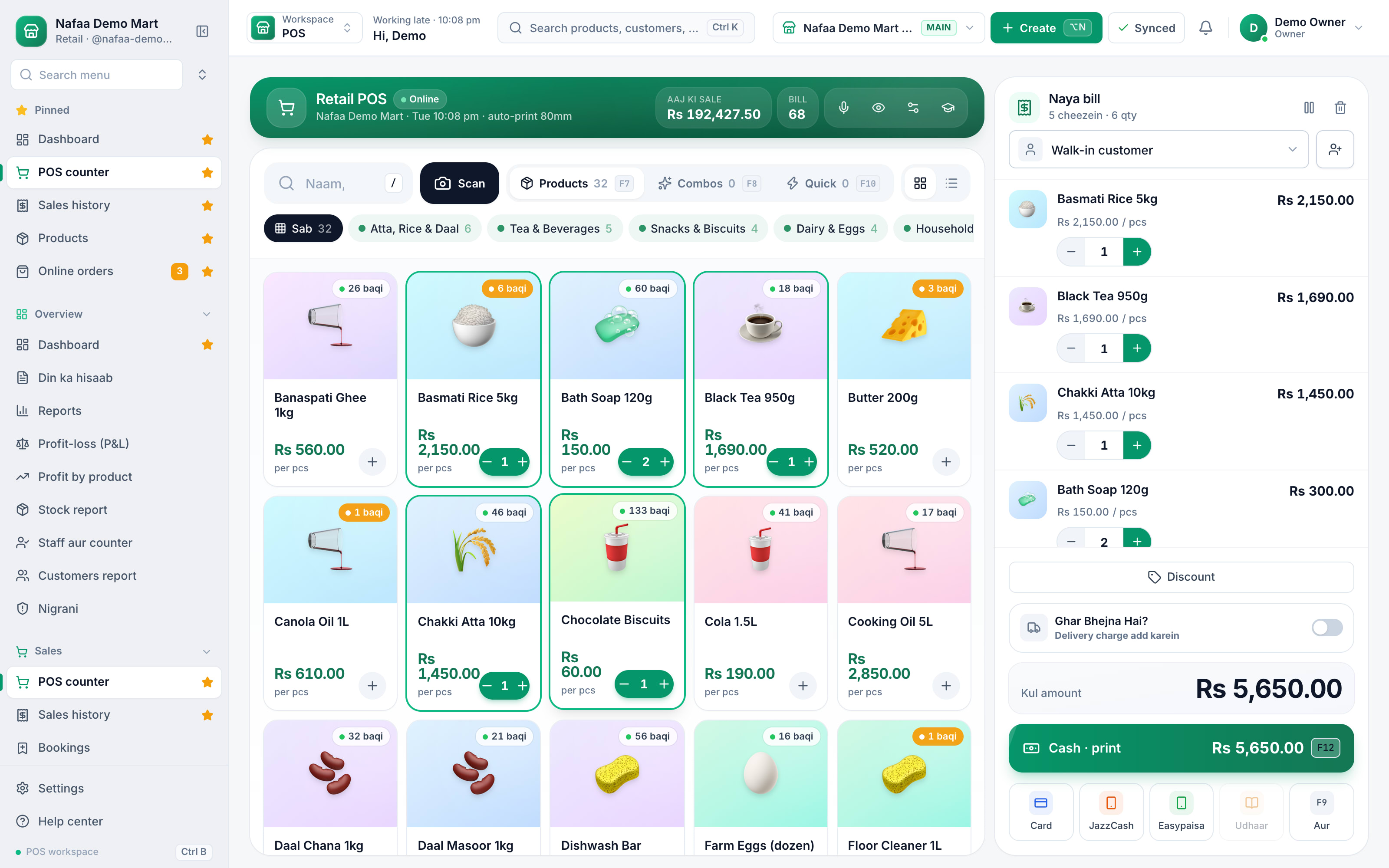
- Bill total
- Cash, card, wallets and udhaar
Using both
Some shops keep a payments app and run the counter on Nafaa. That works: the customer pays into your wallet as usual, and the cashier records the payment as JazzCash, Easypaisa or bank transfer on the bill, so Nafaa's day book shows the split and the wallet balance can be matched at closing. What you should avoid is keeping udhaar in two places. Pick one khata and use it for every customer, or balances will drift apart.
The change of name
The App Store and Google Play listings are both titled "Rupin (formerly Udhaar Book)". Rupin's own website, rupin.pk, presents business banking, payments, invoices, expenses, staff and stock. The udhaar.pk website still describes the Udhaar Book features. If you are choosing today, look at both sites and the current app to see what is offered under the Rupin name.
Moving your khata to Nafaa
Step 1: Write down each balance
From Udhaar Book, note what each customer and supplier owes today.
Step 2: Add customers with opening balances
Enter them in Nafaa so the new khata starts where the old one ended. Set a credit limit for regulars.
Step 3: Import products
Upload your product list from Excel with cost, price and stock.
Step 4: Run the counter for a week
Bill every sale in Nafaa and check the closing count each night.
Step 5: Remind by age
Start with the oldest balances; the khata sorts them for you.
Before you decide
Count the bills on a busy day, check whether you need a scanner and printer, and decide whether you want a wallet inside the app or prefer to keep your own JazzCash, Easypaisa and bank accounts. If the counter matters most, try Nafaa on a real day. For more options, see Khata apps compared and Nafaa vs DigiKhata.
More comparisons
- Compare
Nafaa vs Tally
Nafaa is counter-first software for Pakistani businesses: POS billing, stock, khata and reports. TallyPrime is business management software built around accounting, inventory and tax filing. This page compares them fairly, says when Tally is the better choice, and shows how the two can work together.
- Compare
Nafaa vs Excel
Many shops start with a spreadsheet, and Excel is a very good one. This page compares running a shop in Excel with running it in Nafaa: billing at the counter, stock that updates on each sale, udhaar, several staff and backups. It says honestly when a spreadsheet is enough, and shows how to bring your Excel lists into Nafaa.
- Compare
Nafaa vs Loyverse
Loyverse is a free POS used worldwide, with paid add-ons for longer sales history, employee management and advanced inventory. Nafaa is a paid POS built for Pakistan, with khata, JazzCash and Easypaisa, rupee pricing and purchasing in the product. This page compares them for a Pakistani shop and says plainly when Loyverse is the better choice.
- Compare
Nafaa vs Oscar POS
Oscar is a Pakistani POS for restaurants, retail, grocery, salons, pharmacies and more, with its own card device, a wallet, online ordering and accounting. Nafaa is a POS for the same kinds of business, with udhaar and offline billing at its core. This page compares the two from their own pages and says where Oscar fits better.
- Compare
Nafaa vs CORN POS
CORN POS is a restaurant POS from Pakistan with kitchen displays, tableside ordering, a rider app, branded online ordering and franchise tools, priced per branch in dollars. Nafaa is one system for shops and restaurants alike, priced in rupees. This page compares them for a restaurant or cafe and says where CORN POS is the stronger fit.
- Compare
Nafaa vs Odoo
Odoo is an open source suite of business apps, from accounting and inventory to manufacturing, HR and websites, with a Point of Sale app among them. Nafaa is a POS-first system for Pakistani shops and restaurants. This page compares them for a business in Pakistan and is clear about when Odoo is the better fit.