- Fact-checked
- Updated
Compare
Nafaa vs Oscar POS
Oscar is a Pakistani POS for restaurants, retail, grocery, salons, pharmacies and more, with its own card device, a wallet, online ordering and accounting. Nafaa is a POS for the same kinds of business, with udhaar and offline billing at its core. This page compares the two from their own pages and says where Oscar fits better.
Which one should you choose?
Oscar is a Pakistani POS for restaurants, retail, grocery, salons, pharmacies and more, with its own card device, a wallet, online ordering and accounting. Nafaa is a POS for the same kinds of business, with udhaar and offline billing at its core. This page compares the two from their own pages and says where Oscar fits better.
Roman Urdu mein
Oscar me POS ke saath card machine, wallet aur accounting ek hi company se milte hain. Nafaa me qeemat pehle se likhi hai, aaj hi khud shuru kar sakte hain, aur khata counter ke andar hai.
Key facts
- Short answer
- Oscar for POS plus card acceptance and accounting from one vendor; Nafaa for a self-serve counter with khata and published rupee prices.
- Choose Oscar if
- You want an in-house card machine and wallet, balance sheet reporting, and a guided setup by Oscar's team.
- Choose Nafaa if
- You want to see the price first, start on your own phone or PC today, and keep udhaar at the counter.
- Oscar card rates
- No monthly fee, 2.6% plus half a rupee per transaction, one-time device cost (oscar.pk/payments, 23 Nov 2026)
- Nafaa price
- Paid plans from Rs 1,500 a month, after a 7-day free trial
At a glance
Nafaa
- Price
- Paid plans from Rs 1,500 a month See pricing
- Free trial
- Free
Oscar POS
- Website
- oscar.pk
Written by the Nafaa team. Competitor details come from their own pages and are dated; tell us if something has changed and we will update it. Last checked: .
What each one is
Oscar describes itself as "the easiest way to run your business" and lists solutions for restaurants, cafes, bakeries, franchises, retail, grocery, clothing, pharmacies, salons, gyms, petrol pumps and more. Its grocery page lists barcode scanning, PLU and weight-based billing, expiry, SKU and batch tracking, loyalty, "FBR digital invoicing" and "SRB POS integration", full offline POS with automatic sync, and JazzCash and Easypaisa integration. Oscar also sells payments: an Oscar Wallet and a card device, priced on its payments page at a one-time device cost, no monthly fee, 2.6% per transaction and a fee of half a rupee per transaction. Its accounting module lists daily journal entries, a general ledger, receivables and payables, profit and loss, balance sheet and cash flow, and "Oscar AI" for reporting. The home page invites you to "register your business and start using POS for free" through a request form, and the FAQ says you activate Oscar POS by requesting a free demo, after which its team guides account setup and verifies your business details. Onboarding support is free, and ongoing support plans are available.
Nafaa is a self-serve POS for the same range of businesses. You sign up, add products or import them from Excel, and bill on the phone, tablet or computer you already have. Every bill updates stock, the customer's khata and the cash drawer, and staff roles control Discounts, refunds and who sees Cost and Profit. A restaurant pack, a pharmacy pack and other industry packs add the screens each trade needs.
Nafaa and Oscar POS side by side
| Feature | Nafaa | Oscar POS |
|---|---|---|
| Getting started | Sign up and start the 7-day trial yourself | Request a free demo or register through a form; the team sets up the account after verifying business details |
| Published POS price | From Rs 1,500 a month, in rupees | No POS subscription price published on the pages checked |
| Card payments | Records card payments made on your bank's machine | Own card device: no monthly fee, 2.6% plus half a rupee per transaction |
| Wallets and QR | Shows your own Raast, JazzCash or Easypaisa QR with the bill amount; no Nafaa fee | QR payments, JazzCash and Easypaisa integration, Oscar Wallet |
| Grocery billing | Barcode, quick keys, weighing scale, loose items, batches and expiry | Barcode, PLU and weight-based billing, expiry, SKU and batch tracking |
| Customer udhaar | Khata from the bill, credit limits, WhatsApp reminders | Accounts receivable and reminders for unpaid bills |
| Accounting | Profit, expenses and cash reports; daily journal to QuickBooks, Xero, Zoho Books or Tally (Accounting add-on) | Journal, general ledger, P&L, balance sheet, cash flow |
| Without internet | Counter keeps billing; sales sync later | Full offline POS with automatic sync |
| Branches | Each branch with its own stock; head office sees all | Multi-branch pricing, inventory and reports from one dashboard |
| Tax authority integration | Optional FBR/PRA integration | FBR digital invoicing and SRB POS integration listed |
Sources
- Oscar POS home page and FAQ (business types, demo, support, branches) · Oscar · Accessed
- Oscar POS for grocery (billing, inventory, tax, offline, payments) · Oscar · Accessed
- Oscar POS for retail · Oscar · Accessed
- Oscar payments (Oscar Wallet and card rates) · Oscar · Accessed
- Oscar accounting solution · Oscar · Accessed
Checked on
When Oscar is the better choice
- You want card acceptance from your POS vendor. Oscar sells its own card device with published rates. Nafaa records card payments but does not provide a card machine or process cards.
- You want full accounting inside the POS. Oscar lists a general ledger and balance sheet. Nafaa gives you sales, expense, cash and Profit reports, and sends a daily summary to your accountant's software rather than keeping a full ledger itself.
- You prefer a guided setup. Oscar's process starts with a demo and its team configures the account. Some owners would rather have that than set up on their own.
- You are growing into a chain or franchise and want Oscar's account team alongside the software.
When Nafaa is the better choice
- You want to know the price before talking to sales. Nafaa's plans are on the pricing page, in rupees.
- You want to start today. Sign up, import your products and bill within the hour, on hardware you already own.
- Udhaar is central to your trade. Nafaa's khata is built into the bill: credit limits, balances by age and WhatsApp reminders.
- Your accountant already uses QuickBooks, Xero, Zoho Books or Tally. With the Accounting add-on, Nafaa sends them one balanced journal a day, so you keep their books where they are. See Reports.
- You keep your own wallet and bank accounts. Nafaa's payment QR uses your own Raast, JazzCash or Easypaisa account, so money goes straight to you and Nafaa takes no fee. See Payments.
Stock you can see at a glance
Stock value, low stock and margin on every item, updated by each sale, purchase and return.
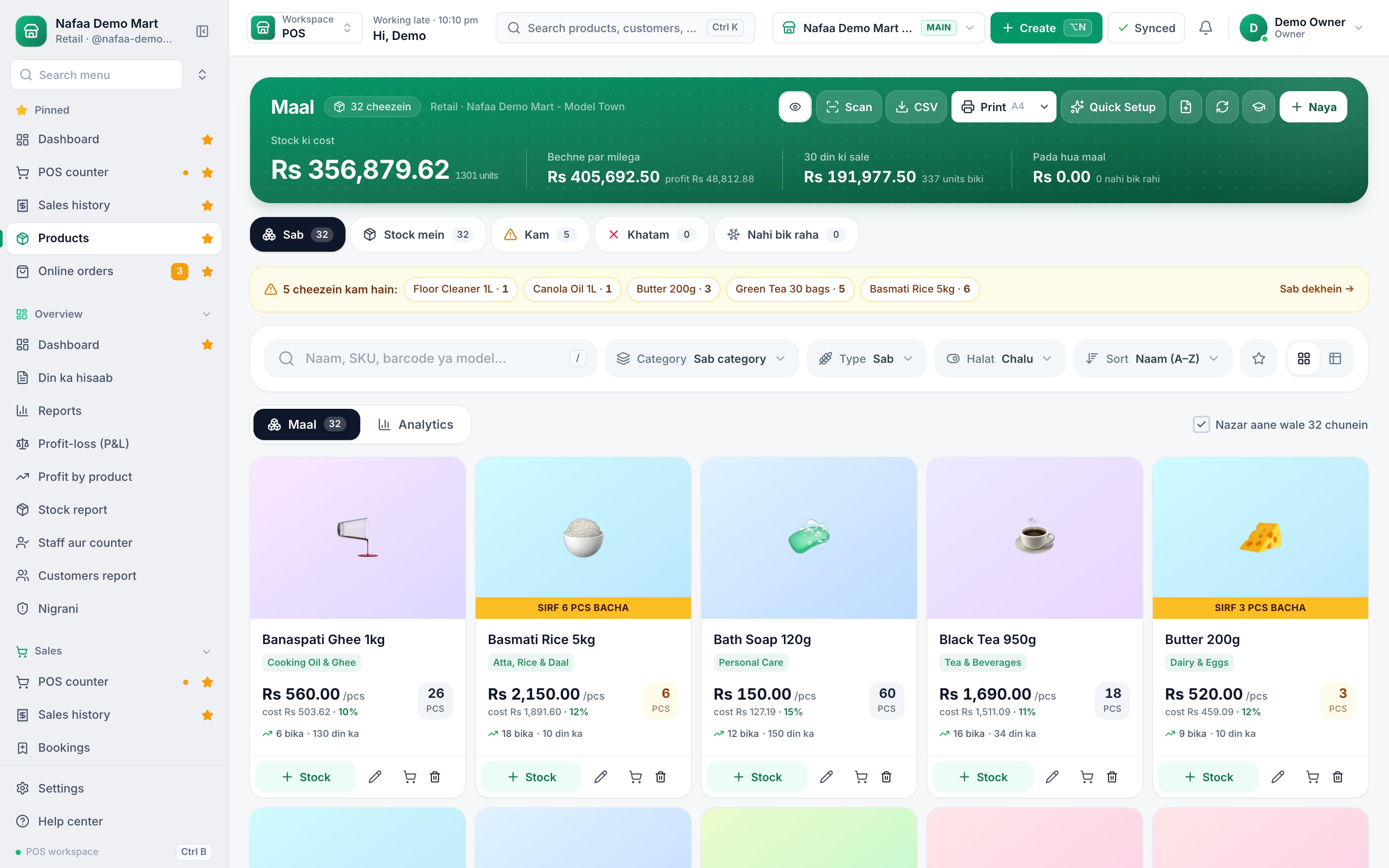
- Stock value and what it will sell for
- Low stock flagged before it runs out
- Cost, price and margin on every item
Working out the real cost
Because Oscar does not publish its POS subscription price, compare on a full quote. Ask for the monthly or yearly software fee per counter and per branch, the cost of the card device, the card rate of 2.6% plus half a rupee per transaction against your bank's rate, any setup or training fee, and what the ongoing support plan costs after onboarding. For Nafaa, the plan price on the pricing page covers the software; hardware such as printers and scanners is your choice, and card payments go through your existing bank machine at your bank's rate.
A shop that takes 500,000 rupees a month on cards would pay about 13,000 rupees in percentage fees at 2.6%, before the per-transaction fee. If your bank's machine is cheaper, that difference matters more than the software fee.
How to compare them fairly
Step 1: Write down your counters, branches and card volume
These decide most of the cost on either side.
Step 2: Ask Oscar for a written quote
Software, device, card rate, setup and ongoing support.
Step 3: Start a Nafaa trial
Import a product list and bill a real hour at the counter.
Step 4: Test without internet
Turn off Wi-Fi mid-sale in both and check what keeps working.
Step 5: Check udhaar and staff limits
Give a test customer credit and see how each tracks it; try a Discount as a cashier.
More comparisons
- Compare
Nafaa vs Tally
Nafaa is counter-first software for Pakistani businesses: POS billing, stock, khata and reports. TallyPrime is business management software built around accounting, inventory and tax filing. This page compares them fairly, says when Tally is the better choice, and shows how the two can work together.
- Compare
Nafaa vs Excel
Many shops start with a spreadsheet, and Excel is a very good one. This page compares running a shop in Excel with running it in Nafaa: billing at the counter, stock that updates on each sale, udhaar, several staff and backups. It says honestly when a spreadsheet is enough, and shows how to bring your Excel lists into Nafaa.
- Compare
Nafaa vs DigiKhata
DigiKhata is a free bookkeeping and khata app with ledgers, cash book, stock book, staff book, card acceptance on the phone and small business loans. Nafaa is a POS-first system where udhaar, stock and staff hang off the bill at the counter. This page compares them fairly and says when DigiKhata is the better choice.
- Compare
Nafaa vs Udhaar Book
Udhaar Book, which its App Store listing says is now called Rupin, is a free khata, cash book and payments app with a business wallet, mobile load and bill payments. Nafaa is a POS-first system for running a counter, stock and udhaar together. This page compares them and says when Udhaar Book is the better pick.
- Compare
Nafaa vs Loyverse
Loyverse is a free POS used worldwide, with paid add-ons for longer sales history, employee management and advanced inventory. Nafaa is a paid POS built for Pakistan, with khata, JazzCash and Easypaisa, rupee pricing and purchasing in the product. This page compares them for a Pakistani shop and says plainly when Loyverse is the better choice.
- Compare
Nafaa vs Odoo
Odoo is an open source suite of business apps, from accounting and inventory to manufacturing, HR and websites, with a Point of Sale app among them. Nafaa is a POS-first system for Pakistani shops and restaurants. This page compares them for a business in Pakistan and is clear about when Odoo is the better fit.