- Fact-checked
- Updated
Compare
Nafaa vs Excel: when a spreadsheet stops being enough
Many shops start with a spreadsheet, and Excel is a very good one. This page compares running a shop in Excel with running it in Nafaa: billing at the counter, stock that updates on each sale, udhaar, several staff and backups. It says honestly when a spreadsheet is enough, and shows how to bring your Excel lists into Nafaa.
Which one should you choose?
Many shops start with a spreadsheet, and Excel is a very good one. This page compares running a shop in Excel with running it in Nafaa: billing at the counter, stock that updates on each sale, udhaar, several staff and backups. It says honestly when a spreadsheet is enough, and shows how to bring your Excel lists into Nafaa.
Key facts
- Short answer
- Keep Excel for lists and analysis; use a POS like Nafaa once billing, stock and udhaar need to stay in step every day.
- Excel is enough if
- You run the shop alone, have a short product list, few credit customers and time to update the sheet each evening.
- Choose Nafaa if
- More than one person bills, stock should drop on each sale, or you want udhaar reminders and live profit.
- Moving over
- Import your product list from .xlsx, .xls or .csv, and export your data back to Excel whenever you want.
- Nafaa price
- Paid plans from Rs 1,500 a month, with a free trial first
At a glance
Nafaa
- Price
- Paid plans from Rs 1,500 a month See pricing
- Free trial
- Free
Microsoft Excel
- Website
- microsoft.com
Written by the Nafaa team. Competitor details come from their own pages and are dated; tell us if something has changed and we will update it. Last checked: .
Running a shop in Excel and in Nafaa
| Feature | Nafaa | Microsoft Excel |
|---|---|---|
| What it is | Software for running a shop: billing, stock, khata, staff and reports | A spreadsheet: rows, columns, formulas and charts for any purpose |
| Billing at the counter | Counter screen with barcode, search, quick keys, receipts and cash drawer | No counter screen; you build your own sheet |
| Stock after a sale | Drops automatically with every bill, per branch | Changes only when someone updates the sheet |
| Several people at once | Each staff member has a login and a role | Co-authoring needs the file on OneDrive or SharePoint with AutoSave on |
| Who changed what | Activity log of changes by person, plus counter rules and PINs | Version history for shared cloud files; no counter rules |
| Udhaar | Khata with limits, ageing and WhatsApp reminders | A sheet you design and keep up to date yourself |
| Profit | Profit by product and profit and loss from bills, purchases and expenses | Whatever formulas you build |
| Phone access | Runs in the browser on any phone; offline billing syncs later | Excel apps for Android and iOS, and Excel for the web |
| Cost | From Rs 1,500 a month after a free trial | Free Excel for the web after a free sign-up (5 GB cloud storage, files saved in OneDrive), or a paid Microsoft 365 plan |
| Data in and out | Import products from .xlsx, .xls or .csv; export records to Excel | Opens and saves .xlsx and .csv |
Sources
- Collaborate on Excel workbooks at the same time with co-authoring · Microsoft Support · Accessed
- Free Microsoft 365 for the web (Word, Excel, PowerPoint), worldwide page · Microsoft · Accessed
Checked on
What Excel does well
It is worth saying clearly: Excel is excellent software, and for some shops it is all they need.
- Flexible. You can design any list, price sheet or report you like.
- Familiar. Many people already know the basics.
- Low cost. Microsoft offers Excel for the web free after a free sign-up, with 5 GB of cloud storage and files saved in OneDrive.
- Good for analysis. Sorting, filtering, pivot tables and charts are hard to beat for one-off questions.
- Shared editing. According to Microsoft's support page, several people can work in the same workbook at the same time when it is stored on OneDrive or SharePoint Online and AutoSave is on.
When Excel is enough
A spreadsheet works well if you run the shop alone or with one helper, your product list is short and stable, you have few credit customers, and you have time each evening to update the sheet. Many shops start here, and there is no shame in staying if it works.
Where Excel starts to hurt
The trouble is not Excel. It is using a general tool for a job that happens hundreds of times a day.
- Copying is the job. Every sale has to be typed into the sheet later, usually from memory or a paper slip. Some never make it.
- Stock drifts. Stock changes only when someone updates it. The sheet says twelve, the shelf has three.
- No counter. A spreadsheet is not a billing screen. There is no receipt, no drawer, no quick way to take cash and JazzCash on the same bill.
- Several people, one file. Shared editing needs the file in the cloud with AutoSave. A copy on one computer and another on the phone soon disagree.
- Mistakes are silent. A deleted row or a broken formula changes your totals without any warning.
- No rules. Anyone who can open the file can change a price or a balance, and the sheet cannot ask for a manager's PIN.
- Udhaar does not remind anyone. The sheet knows the balance; it will not send a WhatsApp message.
Stock that updates itself
Every product shows price, cost, margin and stock left. Each sale lowers the count, and low stock shows up before the shelf is empty.
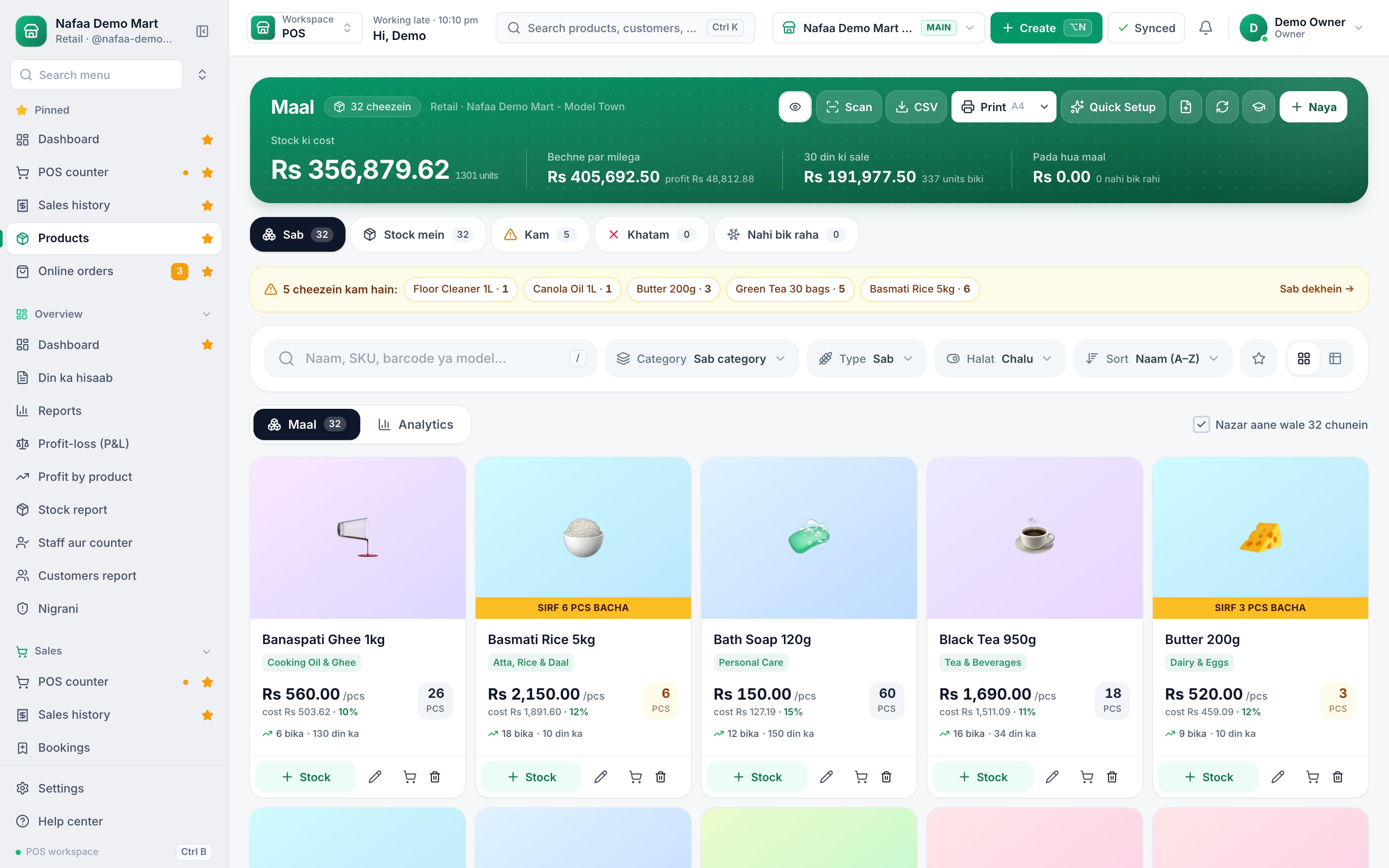
- Stock value at cost
- Items running low
- Price, cost and margin
What changes with Nafaa
The sale is the record. A cashier bills at the counter, and in the same moment stock goes down in the right branch, udhaar goes on the customer's khata, the payment lands under cash, card, JazzCash or Easypaisa, and the day's profit updates. Nothing is typed twice.
Each staff member has their own login and role, so you decide who can change prices, give discounts above a limit, void a bill or see profit. The activity log shows who changed what and when. You can still take your data to Excel at any time: products, customers and reports export to Excel files, and the owner can download a full backup.
Move from Excel to Nafaa in an afternoon
Step 1: Clean your product sheet
One row per item, with name, sale price, cost, stock and barcode if you have one. Sizes and colours can stay as columns.
Step 2: Import it
Upload the .xlsx, .xls or .csv file. Nafaa reads up to 10,000 lines at once and shows problems before saving.
Step 3: Add opening udhaar
Enter each credit customer and their current balance from your sheet.
Step 4: Bill from the counter
From the next sale on, bill in Nafaa. Keep the old sheet for reference.
Step 5: Keep Excel for analysis
Export reports to Excel whenever you want to slice the numbers your own way.
Questions to ask before you decide
- How many people bill or update stock?
- How many sales do you make on a busy day, and how many of them reach the sheet?
- When did your sheet last match the shelf?
- Do you need to see the shop from outside?
If the honest answers are "one", "all of them" and "this week", Excel may be serving you well. If not, the time spent copying and checking is the real cost, and a POS pays for it.
More comparisons
- Compare
Nafaa vs Tally
Nafaa is counter-first software for Pakistani businesses: POS billing, stock, khata and reports. TallyPrime is business management software built around accounting, inventory and tax filing. This page compares them fairly, says when Tally is the better choice, and shows how the two can work together.
- Compare
Nafaa vs DigiKhata
DigiKhata is a free bookkeeping and khata app with ledgers, cash book, stock book, staff book, card acceptance on the phone and small business loans. Nafaa is a POS-first system where udhaar, stock and staff hang off the bill at the counter. This page compares them fairly and says when DigiKhata is the better choice.
- Compare
Nafaa vs Udhaar Book
Udhaar Book, which its App Store listing says is now called Rupin, is a free khata, cash book and payments app with a business wallet, mobile load and bill payments. Nafaa is a POS-first system for running a counter, stock and udhaar together. This page compares them and says when Udhaar Book is the better pick.
- Compare
Nafaa vs Loyverse
Loyverse is a free POS used worldwide, with paid add-ons for longer sales history, employee management and advanced inventory. Nafaa is a paid POS built for Pakistan, with khata, JazzCash and Easypaisa, rupee pricing and purchasing in the product. This page compares them for a Pakistani shop and says plainly when Loyverse is the better choice.
- Compare
Nafaa vs Odoo
Odoo is an open source suite of business apps, from accounting and inventory to manufacturing, HR and websites, with a Point of Sale app among them. Nafaa is a POS-first system for Pakistani shops and restaurants. This page compares them for a business in Pakistan and is clear about when Odoo is the better fit.
- Alternative
Alternative to Desktop POS Software
Many Pakistani shops still run POS software installed on one computer at the counter, often bought years ago with a one-time licence. This page explains what changes when you move to a cloud POS, where an installed system is still the better choice, and how Nafaa keeps billing through internet cuts while working from any device.