- Fact-checked
- Updated
Compare
Nafaa vs CORN POS for restaurants and cafes
CORN POS is a restaurant POS from Pakistan with kitchen displays, tableside ordering, a rider app, branded online ordering and franchise tools, priced per branch in dollars. Nafaa is one system for shops and restaurants alike, priced in rupees. This page compares them for a restaurant or cafe and says where CORN POS is the stronger fit.
Which one should you choose?
CORN POS is a restaurant POS from Pakistan with kitchen displays, tableside ordering, a rider app, branded online ordering and franchise tools, priced per branch in dollars. Nafaa is one system for shops and restaurants alike, priced in rupees. This page compares them for a restaurant or cafe and says where CORN POS is the stronger fit.
Roman Urdu mein
CORN POS sirf restaurant ke liye khaas system hai: kitchen screen, reservation, rider aur franchise. Nafaa restaurant aur dukaan dono ke liye ek hi system hai, rupay me qeemat ke saath.
Key facts
- Short answer
- CORN POS for a restaurant-only business that wants specialist kitchen, delivery and franchise tools; Nafaa for one system across food and retail, in rupees.
- Choose CORN POS if
- You run several outlets or a franchise and want a branded ordering app, reservations and menu engineering from one vendor.
- Choose Nafaa if
- You run a dhaba, cafe, bakery or takeaway, perhaps alongside a shop, and want tables, kitchen tickets, stock and khata in one account.
- CORN POS price
- Starter $50 per branch per month; Pro $130 per branch per month; Elite: contact sales (cornpos.com/pricing, 23 Nov 2026)
- Nafaa price
- Paid plans from Rs 1,500 a month, after a 7-day free trial
At a glance
Nafaa
- Price
- Paid plans from Rs 1,500 a month See pricing
- Free trial
- Free
CORN POS
- Website
- cornpos.com
Written by the Nafaa team. Competitor details come from their own pages and are dated; tell us if something has changed and we will update it. Last checked: .
What each one is
CORN POS presents itself as "the complete restaurant POS solution". Its home page lists a cloud-based POS with an offline mode that keeps data on both its live server and a local server, a kitchen display terminal, tableside ordering on Android and iOS, a loyalty app, an owner insights app, a rider app for delivery tracking, and a branded online ordering website and app. It runs in a web browser, on Android tablets, iPads and desktops. The site names integrations with FBR, SRB, PRA and KPRA, and offers phone and WhatsApp support around the clock. The pricing page says the company has provided point of sale solutions "for more than 15 years".
Nafaa is one product for many kinds of business, with a restaurant pack switched on for restaurants and cafes. That pack adds a table layout by section, a kitchen ticket (KOT) screen with timers, kitchen stations such as tandoor, karahi and BBQ, recipes that deduct ingredients from stock, item modifiers, riders with cash handover, happy-hour pricing and splitting a bill by items. Shops use the same account for retail billing, so a restaurant with a bakery counter or a small mart uses one system.
Nafaa and CORN POS side by side
| Feature | Nafaa | CORN POS |
|---|---|---|
| Built for | Shops and restaurants; restaurant pack for food businesses | Restaurants, cafes and franchises |
| Tables and orders | Table layout by section with running bills; dine-in, takeaway and delivery | Table management with live status, timing and server assignment; tableside ordering |
| Kitchen | KOT screen with timers and kitchen stations | Kitchen display with order routing, rush mode and cook-time tracking |
| Recipes and stock | Recipes deduct ingredients; purchases and stock counts | Ingredient deduction, recipe costing, waste and variance |
| Delivery | Riders, delivery tracking and rider cash handover | Rider app with tracking, zones and route optimisation |
| Online ordering | Nafaa online store add-on, on the same stock | Branded ordering website and native iOS and Android ordering app |
| Reservations | Tables can be marked reserved | Online and phone bookings with cancellations and special requests |
| Without internet | Counter keeps billing; sales sync later | Offline mode; data kept on live and local server |
| Tax authority integration | Optional FBR/PRA integration | FBR, SRB, PRA and KPRA listed |
| Price | From Rs 1,500 a month, in rupees | Starter $50 per branch per month; Pro $130 per branch per month; Elite: contact sales |
Sources
- CORN POS home page (restaurant POS features, devices, tax integrations) · CORN POS · Accessed
- CORN POS pricing (plans and core features) · CORN POS · Accessed
Checked on
When CORN POS is the better choice
- You run a chain or a franchise. CORN POS has an Elite plan "for multi-location chains/franchises" and lists franchise order management on its home page. Nafaa handles several branches, but CORN POS is built around this case.
- You want a branded ordering app. CORN POS offers a native iOS and Android ordering app in your restaurant's name. Nafaa's online store is a website, not a separate app per restaurant.
- Reservations are a big part of your business. CORN POS lists online and phone bookings with cancellations and special requests on its pricing page. Ask for a demo of that flow if bookings drive your evenings.
- You want menu engineering and kitchen analytics, such as cook-time tracking and rush mode on the kitchen screen.
- You value a long track record. CORN POS says it has provided point of sale solutions to small and medium businesses for more than 15 years.
When Nafaa is the better choice
- You sell more than food. A restaurant with a bakery counter, a cafe inside a shop, or an owner who also runs a mart can use one Nafaa account for all of it. See Restaurant & Cafe.
- You want rupee pricing. Nafaa plans are priced in Pakistani rupees; CORN POS publishes its plan prices in dollars ($).
- Udhaar is part of your trade. Offices, regular customers and caterers who pay monthly have a khata with credit limits and WhatsApp reminders. See Khata.
- You want to start on your own. Sign up, add the menu and bill on the phone or computer you have, without waiting for a demo.
- Smaller places. A dhaba, chai stall or takeaway with one counter may find a specialist restaurant suite more than it needs.
Tables, running bills and sections
Every table by section: free, seated with its timer and running bill, bill printed or reserved. Orders go to the kitchen screen by station.
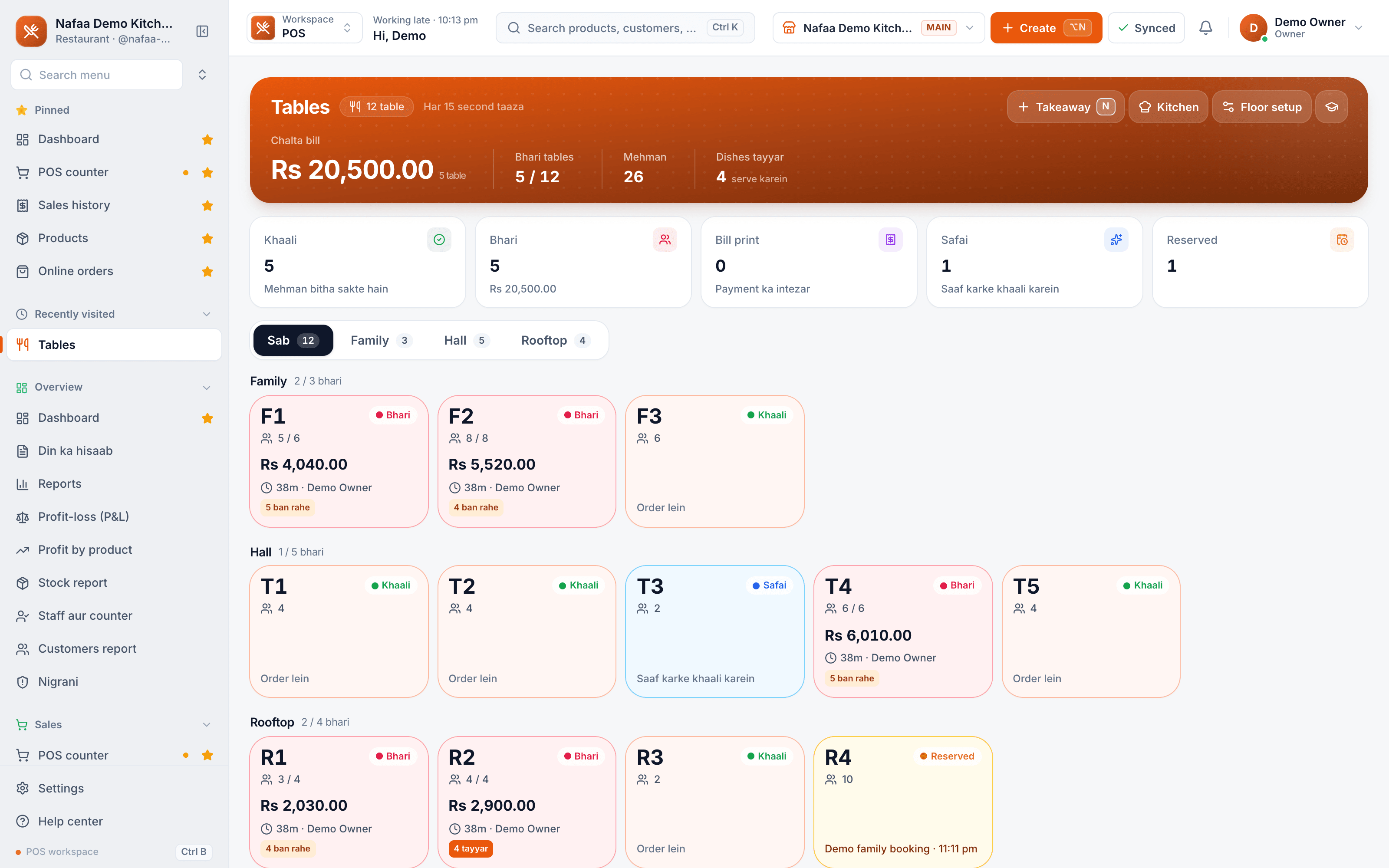
- Running bills on the floor
- Sections: family, hall, rooftop
- Guests, time and running bill
The kitchen sees every ticket
Tickets show how long they have waited and whether they are dine-in, takeaway or delivery, so nothing sits forgotten during the rush.
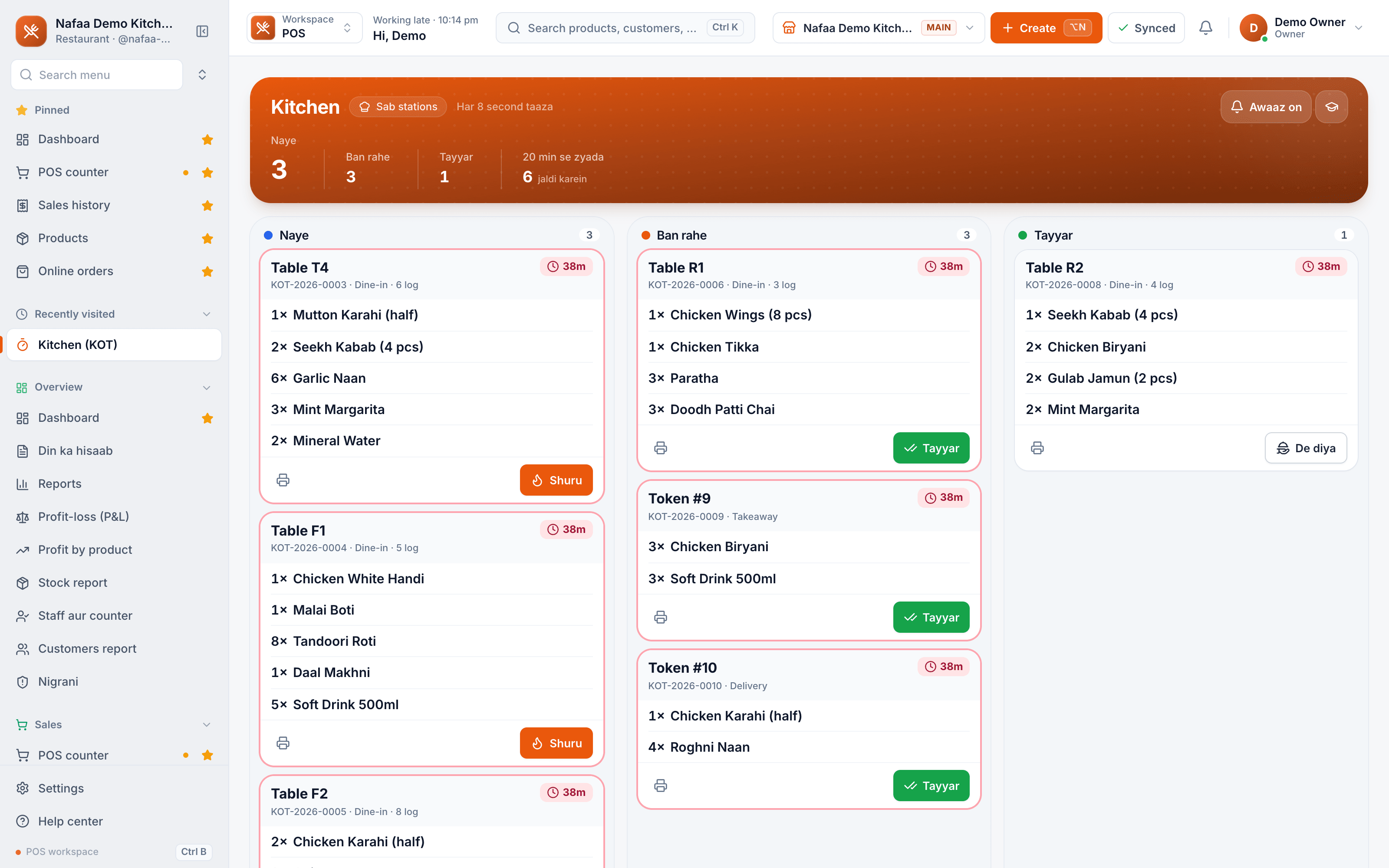
- New, cooking, ready and over 20 minutes
- Minutes since the ticket came in
How to compare them on your own floor
Step 1: List your must-haves
Tables, kitchen screen, delivery, online orders, reservations, khata, tax integration. Mark what you use daily.
Step 2: Count outlets and counters
CORN POS prices per branch; check how many branches and devices each plan covers.
Step 3: Try a lunch rush
Book a CORN POS demo, start a Nafaa trial, and bill a real hour of orders in each.
Step 4: Check offline billing
Unplug the router mid-service and see what keeps working.
Step 5: Ask about support hours
Late-night service needs help after midnight; ask both vendors how they handle it.
Questions to settle first
- Is your business only food, or food plus retail?
- How many outlets do you have now, and in two years?
- Do you need a branded ordering app, or are Foodpanda and a website enough?
- Do diners book tables in advance?
- Does your province require you to connect your POS to the tax authority? See tax compliance.
If the answers describe a growing restaurant chain, CORN POS is built for that. If they describe one or two outlets, mixed food and retail, or a tighter budget in rupees, try Nafaa. For a wider look, see How to choose POS software in Pakistan.
More comparisons
- Compare
Nafaa vs Tally
Nafaa is counter-first software for Pakistani businesses: POS billing, stock, khata and reports. TallyPrime is business management software built around accounting, inventory and tax filing. This page compares them fairly, says when Tally is the better choice, and shows how the two can work together.
- Compare
Nafaa vs Excel
Many shops start with a spreadsheet, and Excel is a very good one. This page compares running a shop in Excel with running it in Nafaa: billing at the counter, stock that updates on each sale, udhaar, several staff and backups. It says honestly when a spreadsheet is enough, and shows how to bring your Excel lists into Nafaa.
- Compare
Nafaa vs DigiKhata
DigiKhata is a free bookkeeping and khata app with ledgers, cash book, stock book, staff book, card acceptance on the phone and small business loans. Nafaa is a POS-first system where udhaar, stock and staff hang off the bill at the counter. This page compares them fairly and says when DigiKhata is the better choice.
- Compare
Nafaa vs Udhaar Book
Udhaar Book, which its App Store listing says is now called Rupin, is a free khata, cash book and payments app with a business wallet, mobile load and bill payments. Nafaa is a POS-first system for running a counter, stock and udhaar together. This page compares them and says when Udhaar Book is the better pick.
- Compare
Nafaa vs Loyverse
Loyverse is a free POS used worldwide, with paid add-ons for longer sales history, employee management and advanced inventory. Nafaa is a paid POS built for Pakistan, with khata, JazzCash and Easypaisa, rupee pricing and purchasing in the product. This page compares them for a Pakistani shop and says plainly when Loyverse is the better choice.
- Compare
Nafaa vs Odoo
Odoo is an open source suite of business apps, from accounting and inventory to manufacturing, HR and websites, with a Point of Sale app among them. Nafaa is a POS-first system for Pakistani shops and restaurants. This page compares them for a business in Pakistan and is clear about when Odoo is the better fit.