- Fact-checked
- Updated
Compare
Nafaa vs Tally: counter software or accounting software?
Nafaa is counter-first software for Pakistani businesses: POS billing, stock, khata and reports. TallyPrime is business management software built around accounting, inventory and tax filing. This page compares them fairly, says when Tally is the better choice, and shows how the two can work together.
Which one should you choose?
Nafaa is counter-first software for Pakistani businesses: POS billing, stock, khata and reports. TallyPrime is business management software built around accounting, inventory and tax filing. This page compares them fairly, says when Tally is the better choice, and shows how the two can work together.
Key facts
- Short answer
- Nafaa for running the counter, stock and udhaar; TallyPrime for full bookkeeping and accounts.
- Choose Nafaa if
- You bill customers all day, sell from stock, give udhaar and want sales, stock and profit on your phone.
- Choose Tally if
- Your accountant keeps full books, you need ledgers, vouchers and financial statements, and billing is a small part of the day.
- Use both
- With the Accounting add-on, Nafaa prepares a daily voucher file that TallyPrime can import, so the counter and the books agree.
- Nafaa price
- Paid plans from Rs 1,500 a month, with a free trial first
At a glance
Nafaa
- Price
- Paid plans from Rs 1,500 a month See pricing
- Free trial
- Free
Tally
- Website
- tallysolutions.com
Written by the Nafaa team. Competitor details come from their own pages and are dated; tell us if something has changed and we will update it. Last checked: .
Nafaa and TallyPrime side by side
| Feature | Nafaa | TallyPrime |
|---|---|---|
| What it is built for | Running a shop or business counter: billing, stock, khata, staff and reports | Business management with accounting, inventory, tax filing and reports |
| Counter billing (POS) | Barcode, search and quick keys; cash, card, JazzCash, Easypaisa and udhaar on one screen | Point of sale is not described on the TallyPrime product page |
| Accounting books | Sales, expenses and profit reports; full double-entry books are left to your accountant's software | "Accurate accounting and bookkeeping" |
| Inventory | Stock per branch with variants, units, batches, transfers and stock counts | "Complete inventory control and tracking" |
| Customer udhaar (khata) | Khata with credit limits, ageing and WhatsApp reminders | Not described as a khata on the product page |
| Tax features | Optional FBR/PRA POS integration | India product page lists GST, e-invoicing, e-way bills and TDS/TCS, which are Indian tax systems |
| Where it runs | In the browser on a phone, tablet or computer; offline billing syncs later | Installed on a PC; a hosted Cloud Access option is offered |
| Several users | Staff logins with roles and permissions (plan limits apply) | Multi-user licence: "unlimited users on the same LAN environment" |
| Pricing shown | From Rs 1,500 a month after a free trial | India site: rupee prices, monthly to lifetime licences; International site: lifetime Silver licence at USD 630, with licence types for all countries except North America and for SAARC countries |
| Working together | Daily voucher file (XML) for import into TallyPrime (Accounting add-on) | Import Data takes masters and transactions in Excel, XML or JSON |
Sources
- TallyPrime product page (features, editions, licences) · Tally Solutions · Accessed
- Import Data into TallyPrime (help) · Tally Solutions · Accessed
- Buy TallyPrime, International site (licence types and USD price) · Tally Solutions · Accessed
Checked on
Two different jobs
Nafaa and TallyPrime are often mentioned together, but they solve different problems.
TallyPrime is accounting-led. Tally's own product page describes it as business management software for managing books, inventory, tax filing and reports, with editions for a single PC (Silver) and for multi-user access on several PCs (Gold), and a TallyPrime Cloud Access service. It is sold outside India too: the International site offers licences for all countries except North America and for SAARC countries, and advertises a lifetime licence "at USD 630". Its tax features, as listed on the India product page, are built for India: GST returns, e-invoicing, e-way bills and TDS/TCS. It is strong at what an accountant needs: ledgers, vouchers, financial statements and audit trails.
Nafaa is counter-led. It is built for the person standing behind the counter with a queue in front of them: scan, bill, take cash or JazzCash or put it on udhaar, print or WhatsApp the receipt, and move on. Stock goes down with every sale, the khata updates, and the owner sees the day's sale, profit and cash on the phone.
The question is not which is better software. It is which job you need done every day.
When Tally is the better choice
Be honest with yourself about what your business does. TallyPrime is likely the better fit if:
- You need full accounts. Ledgers, journal vouchers, balance sheets and financial statements prepared in-house are Tally's home ground. Nafaa gives you sales, expense and profit reports, not a full set of books.
- Your accountant already uses it. If your accountant knows Tally and keeps your books in it, changing that has real cost.
- Billing is a small part of the day. A trading office that issues a few invoices a day and spends most of its time on payments, receipts and reconciliation does not need a fast counter.
- You work in India. The tax features on Tally's India product page are for Indian GST and related systems.
When Nafaa is the better choice
- You serve customers at a counter. Billing speed, barcode scanning, quick keys, loose goods by weight and a receipt in seconds matter more than ledger structure.
- Udhaar is part of your trade. A khata with limits, ageing and WhatsApp reminders is built into the counter.
- You want to see the shop from anywhere. Nafaa runs in the browser on a phone, tablet or computer, and billing continues offline when the internet drops.
- Your staff need simple screens. Cashiers learn a counter faster than an accounting package, and roles limit what each person can do.
- You have branches. Each shop has its own stock and cash, transfers are tracked, and the owner sees all shops together.
The counter Tally users add alongside
Products on the left, the bill on the right and every payment method one tap away. Each sale moves stock, the khata and the reports at once.
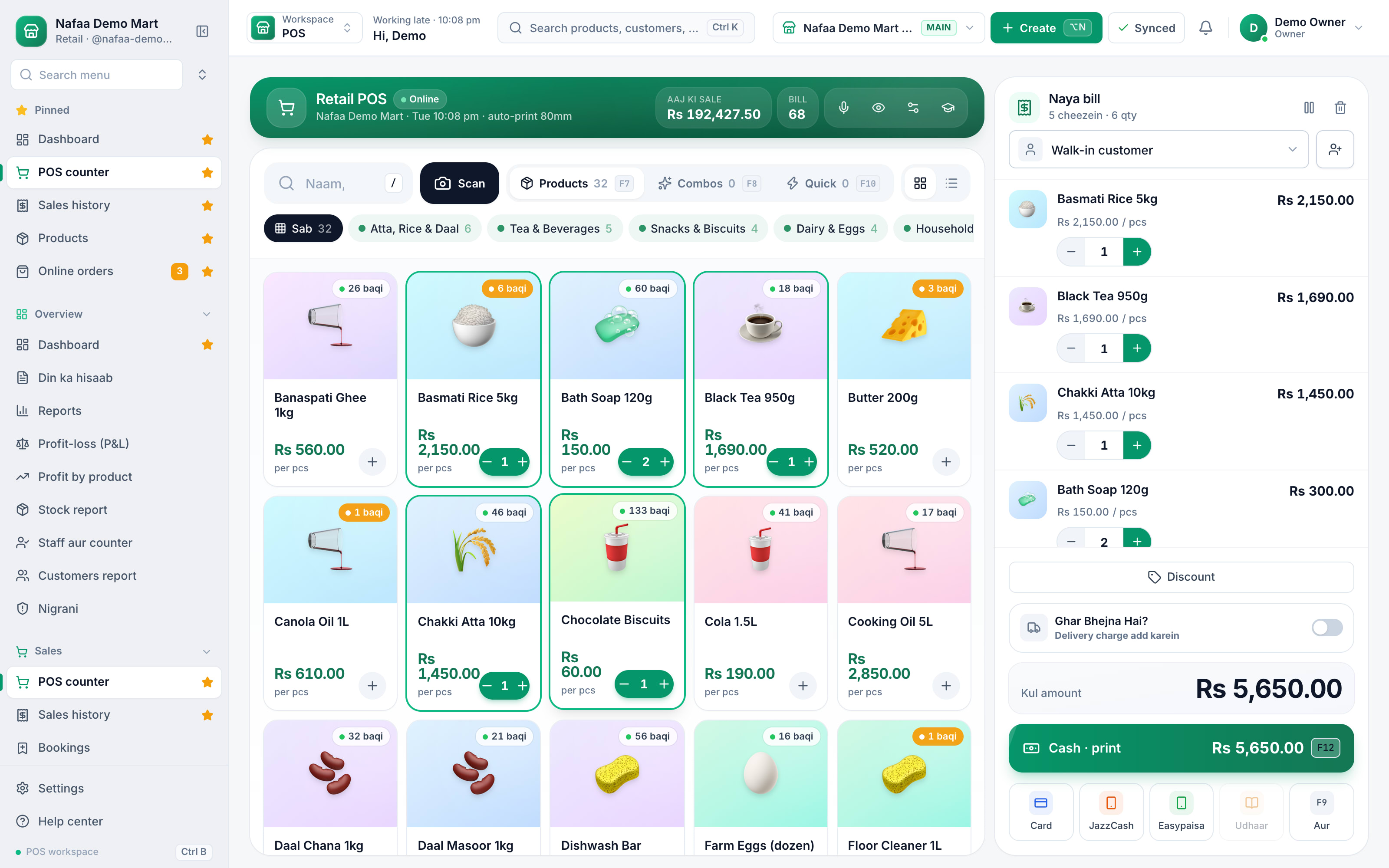
- Categories and quick keys
- Stock left on every tile
- Card, JazzCash, Easypaisa, udhaar
Using Nafaa and Tally together
Many businesses do not choose. They run Nafaa at the counter and keep TallyPrime for the books. With the Accounting add-on, Nafaa's accounting settings include a Tally connection that prepares an XML file of the day's vouchers: sales by payment method, udhaar given, discounts, refunds, udhaar received back and expenses, with cost of goods as an option. You map each item to the ledger names your accountant already uses, and the accountant imports the file into TallyPrime through its import option. Each voucher carries a fixed ID, so importing the same day again updates it instead of creating a duplicate.
The accountant gets a clean daily summary instead of hundreds of bills, and the counter stays fast.
Set up Nafaa with Tally in an afternoon
Step 1: Start a Nafaa trial
Add your products, or import them from an Excel list, and bill a few test sales.
Step 2: Ask your accountant for ledger names
Sales, discounts, returns, cash, bank, wallets, debtors and expense ledgers as they are named in Tally.
Step 3: Map the ledgers in Nafaa
Enter those names once in Nafaa's Tally settings. Choose whether to include cost of goods and expenses.
Step 4: Export and import one day
Download the day's file and let your accountant import it into TallyPrime. Check the day book against Nafaa's day report.
Step 5: Make it a routine
Export daily or weekly. The counter keeps billing; the books stay current.
Questions to ask before you decide
- Who uses the software most: a cashier or an accountant?
- How many bills do you make on a busy day?
- Do you give udhaar, and do you chase it?
- Do you need to see sales from outside the shop?
- Do you need full books in-house, or does an accountant handle them?
If the answers point to the counter, start with Nafaa and keep Tally for the books if you already use it. If they point to accounts, Tally may be all you need.
More comparisons
- Compare
Nafaa vs Excel
Many shops start with a spreadsheet, and Excel is a very good one. This page compares running a shop in Excel with running it in Nafaa: billing at the counter, stock that updates on each sale, udhaar, several staff and backups. It says honestly when a spreadsheet is enough, and shows how to bring your Excel lists into Nafaa.
- Compare
Nafaa vs Loyverse
Loyverse is a free POS used worldwide, with paid add-ons for longer sales history, employee management and advanced inventory. Nafaa is a paid POS built for Pakistan, with khata, JazzCash and Easypaisa, rupee pricing and purchasing in the product. This page compares them for a Pakistani shop and says plainly when Loyverse is the better choice.
- Compare
Nafaa vs Zoho Inventory
Zoho Inventory is cloud inventory and order management for businesses that sell across channels and ship orders, priced in US dollars by orders, users and locations. Nafaa is a POS-first system for Pakistani shops, with stock, khata and purchasing built around the counter. This page compares them and says when Zoho Inventory is the better choice.
- Compare
Nafaa vs Lightspeed (Vend)
Vend is now Lightspeed Retail (X-Series), a cloud retail POS from Lightspeed with eCommerce, loyalty, wholesale ordering and integrated payments, priced in US dollars. Nafaa is a POS built for Pakistani shops, priced in rupees. This page compares them for a retailer in Pakistan and says where Lightspeed is the stronger product.
- Alternative
Alternative to the Paper Khata Register
The paper khata register has run Pakistani shops for generations, and for a few credit customers it still works. This page looks at the alternatives, from a better paper routine to a khata app to a POS that writes the khata itself, and shows how to move your balances over without losing your customers' trust.
- Alternative
Excel Alternative for Running a Shop
Many Pakistani shops run their stock, sales and udhaar on Excel sheets, and it works until it does not. This page explains when a spreadsheet stops being enough, what the realistic alternatives are, how Nafaa compares with Excel for daily shop work, and how to move your sheets over without retyping them.