- Fact-checked
- Updated
Compare
Nafaa vs Odoo for a business in Pakistan
Odoo is an open source suite of business apps, from accounting and inventory to manufacturing, HR and websites, with a Point of Sale app among them. Nafaa is a POS-first system for Pakistani shops and restaurants. This page compares them for a business in Pakistan and is clear about when Odoo is the better fit.
Which one should you choose?
Odoo is an open source suite of business apps, from accounting and inventory to manufacturing, HR and websites, with a Point of Sale app among them. Nafaa is a POS-first system for Pakistani shops and restaurants. This page compares them for a business in Pakistan and is clear about when Odoo is the better fit.
Roman Urdu mein
Odoo poori company ka ERP hai: factory, HR, CRM aur accounting, aksar partner ki madad se lagta hai. Nafaa dukaan aur restaurant ke counter, Stock aur khata ke liye hai, jo aap aaj khud shuru kar sakte hain.
Key facts
- Short answer
- Odoo for a company-wide ERP with a partner to set it up; Nafaa for a shop or restaurant that wants to bill today.
- Choose Odoo if
- You manufacture, run HR and CRM in one system, need full double-entry accounting, or want to customise the code.
- Choose Nafaa if
- Your day is the counter, the stock room and udhaar, and you want to set it up yourself without a project.
- Odoo price
- One App Free; Standard and Custom priced per user per month in US dollars (odoo.com/pricing, 23 Nov 2026)
- Nafaa price
- Paid plans from Rs 1,500 a month, after a 7-day free trial
At a glance
Nafaa
- Price
- Paid plans from Rs 1,500 a month See pricing
- Free trial
- Free
Odoo
- Website
- odoo.com
Written by the Nafaa team. Competitor details come from their own pages and are dated; tell us if something has changed and we will update it. Last checked: .
What each one is
Odoo describes itself as "a suite of open source business apps that cover all your company needs: CRM, eCommerce, accounting, inventory, point of sale, project management, etc." Its pricing page offers three plans. One App Free gives one app with unlimited users at no cost. Standard includes all apps for a price per user per month on Odoo Online, Odoo's cloud. Custom adds Odoo Studio, multi-company, the external API and the choice of hosting on Odoo.sh or on your own servers. The page says all plans include "unlimited support, hosting and maintenance", with upgrades at no extra fee, while implementation services, maintenance of custom code and in-app credits such as SMS are not included. Odoo's documentation says its Point of Sale "works on any device with a web browser, even if you are temporarily offline", that product moves go straight into stock, and that data is consolidated across shops.
Nafaa is narrower and ready on day one. It is built for a business in Pakistan where the counter is the centre: billing with barcode and quick keys, cash, card, JazzCash, Easypaisa and udhaar on one bill, a khata with credit limits and reminders, purchasing, staff roles, branches and Profit reports. Industry packs add the screens a pharmacy, restaurant, garment store or mobile shop needs. There is no implementation project: you sign up, import products and start.
Nafaa and Odoo side by side
| Feature | Nafaa | Odoo |
|---|---|---|
| Scope | Counter, stock, khata, purchasing, staff, branches and reports | Full suite: accounting, inventory, POS, CRM, manufacturing, HR, websites and more |
| Pricing model | Monthly plan per business, in rupees | One App Free; Standard and Custom per user per month, in US dollars |
| Price shown | From Rs 1,500 a month after a 7-day free trial | Standard US$7.25 per user per month billed yearly (US$9.10 monthly), a discount valid for 12 months for initial users; regular price US$8.95 (US$11.20 monthly) |
| Setup | Self-serve: sign up, import products, bill | Self-serve possible; implementation services sold separately by Odoo or partners |
| Without internet | Counter keeps billing; sales sync later | POS works in a browser "even if you are temporarily offline" |
| Customer udhaar | Khata from the bill, credit limits, WhatsApp reminders by age | Customer invoices and receivables in accounting |
| Accounting | Sales, expenses, cash and Profit; daily journal to QuickBooks, Xero, Zoho Books or Tally (Accounting add-on) | Full accounting app |
| Customisation | Settings, industry packs and roles; no custom code | Odoo Studio, external API and custom modules on the Custom plan |
| Local payments | JazzCash, Easypaisa and bank transfer as their own methods; your own payment QR | JazzCash and Easypaisa not mentioned on the pages checked |
| Support | WhatsApp, phone and email, in Urdu or English | Email support Monday to Friday, 24/5, in English, French, Spanish or Dutch |
Sources
- Odoo pricing (One App Free, Standard, Custom; inclusions) · Odoo · Accessed
- Odoo Point of Sale for shops · Odoo · Accessed
- Odoo 18.0 documentation: Point of Sale · Odoo · Accessed
Checked on
When Odoo is the better choice
- You need more than a shop. If you manufacture, run payroll and recruitment, manage projects or need a CRM in the same system, Odoo covers those and Nafaa does not.
- You need full double-entry accounting with a balance sheet in the same database as your POS. Nafaa keeps operational money records and sends a summary to accounting software instead.
- You will customise. Odoo's Custom plan opens Studio, the API and custom modules. A company with its own developers or a partner can shape it to its process.
- You run several companies and need multi-company accounting.
- You want open source and the option to host it yourself.
When Nafaa is the better choice
- You want to bill this week, not after a project. Nafaa has no implementation phase. Most shops add products and bill the same day.
- Udhaar is daily business. Nafaa's khata is part of the bill, with credit limits, ageing and WhatsApp reminders.
- The cost should not grow with every user. Odoo charges per user. Nafaa charges per plan, with staff logins included up to the plan's limit.
- You want local payment methods and rupee pricing, with support on WhatsApp in Urdu.
- Your staff are not trained in ERP software. Nafaa's counter is designed for a cashier to learn in an afternoon, with keyboard shortcuts for speed. See POS.
The owner's view without an ERP
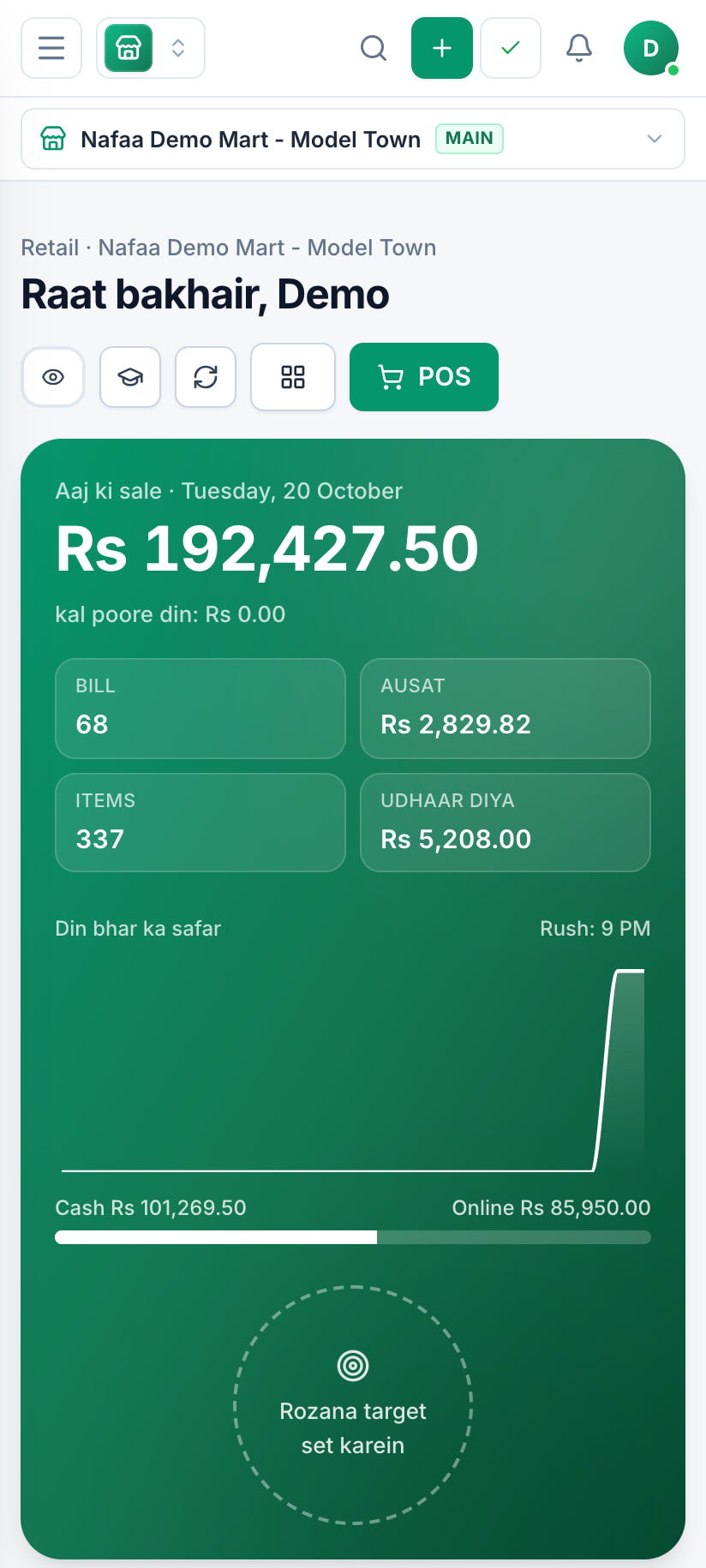
Today's sale, Profit, cash in the drawer and udhaar to collect, on the owner's phone, from the same data the counter writes.
A common path: Nafaa now, ERP later
Many growing businesses in Pakistan start with a POS and add an ERP years later, when they open a factory or a large distribution arm. If that is your plan, start where the money comes in. With the Accounting add-on, Nafaa can send a balanced daily journal to QuickBooks Online, Xero or Zoho Books, or a voucher file to Tally, so your accountant has clean figures. When the day comes to move to a full ERP, products, customers and opening balances can be exported from Nafaa as spreadsheets.
If you already know you need manufacturing, HR and full accounting in one place, it is usually cheaper to start in Odoo from the beginning than to move later.
Questions to answer before choosing
Step 1: What must the system do in the first month?
If the answer is billing, stock and udhaar, a POS is enough. If it includes production orders or payroll, look at Odoo.
Step 2: Who will set it up?
Odoo projects often use a partner. Ask for a quote that includes setup, training and the first year of support.
Step 3: How many users will log in?
Multiply by Odoo's per-user price and compare with a Nafaa plan.
Step 4: What happens when the internet drops?
Test both at the counter with Wi-Fi turned off.
Step 5: Where does your accountant work?
If in QuickBooks, Xero, Zoho Books or Tally, Nafaa can feed them.
More comparisons
- Compare
Nafaa vs Tally
Nafaa is counter-first software for Pakistani businesses: POS billing, stock, khata and reports. TallyPrime is business management software built around accounting, inventory and tax filing. This page compares them fairly, says when Tally is the better choice, and shows how the two can work together.
- Compare
Nafaa vs Excel
Many shops start with a spreadsheet, and Excel is a very good one. This page compares running a shop in Excel with running it in Nafaa: billing at the counter, stock that updates on each sale, udhaar, several staff and backups. It says honestly when a spreadsheet is enough, and shows how to bring your Excel lists into Nafaa.
- Compare
Nafaa vs DigiKhata
DigiKhata is a free bookkeeping and khata app with ledgers, cash book, stock book, staff book, card acceptance on the phone and small business loans. Nafaa is a POS-first system where udhaar, stock and staff hang off the bill at the counter. This page compares them fairly and says when DigiKhata is the better choice.
- Compare
Nafaa vs Udhaar Book
Udhaar Book, which its App Store listing says is now called Rupin, is a free khata, cash book and payments app with a business wallet, mobile load and bill payments. Nafaa is a POS-first system for running a counter, stock and udhaar together. This page compares them and says when Udhaar Book is the better pick.
- Compare
Nafaa vs Oscar POS
Oscar is a Pakistani POS for restaurants, retail, grocery, salons, pharmacies and more, with its own card device, a wallet, online ordering and accounting. Nafaa is a POS for the same kinds of business, with udhaar and offline billing at its core. This page compares the two from their own pages and says where Oscar fits better.
- Compare
Nafaa vs CORN POS
CORN POS is a restaurant POS from Pakistan with kitchen displays, tableside ordering, a rider app, branded online ordering and franchise tools, priced per branch in dollars. Nafaa is one system for shops and restaurants alike, priced in rupees. This page compares them for a restaurant or cafe and says where CORN POS is the stronger fit.