NafaaNafaa POS app for Android and iPhone
Your whole business on your phone
Make bills, scan barcodes with the camera, keep every customer's khata and see today's profit, from the phone in your pocket. The app keeps working when the internet drops and syncs by itself when it comes back.

- Android and iPhone
- Works offline
- English, Urdu, Roman Urdu
The app in short
The Nafaa POS app for Android and iPhone runs your business from the phone: billing with the camera as a barcode scanner, stock, khata with WhatsApp reminders, profit and reports, online orders and alerts. It keeps billing without internet and syncs by itself, in English, Urdu or Roman Urdu.
Roman Urdu mein
Nafaa POS app Android aur iPhone par: bill, barcode, stock, khata, Profit aur online orders, sab phone par. Internet na ho tab bhi bill bante hain aur baad me khud sync ho jate hain.
Key facts
- Android
- Nafaa POS on Google Play
- iPhone and iPad
- Nafaa POS on the App Store, for signing in to an existing account
- Without internet
- Bills, stock and khata work offline and sync by themselves
- Languages
- English, Urdu (right to left) and Roman Urdu
- Cost
- Free to download; it uses your Nafaa account and plan
Features
What the app does
The app is the same Nafaa you use on the computer, built for a phone screen. Everything below runs on one account with the web app and the Windows desktop app.
Billing in seconds
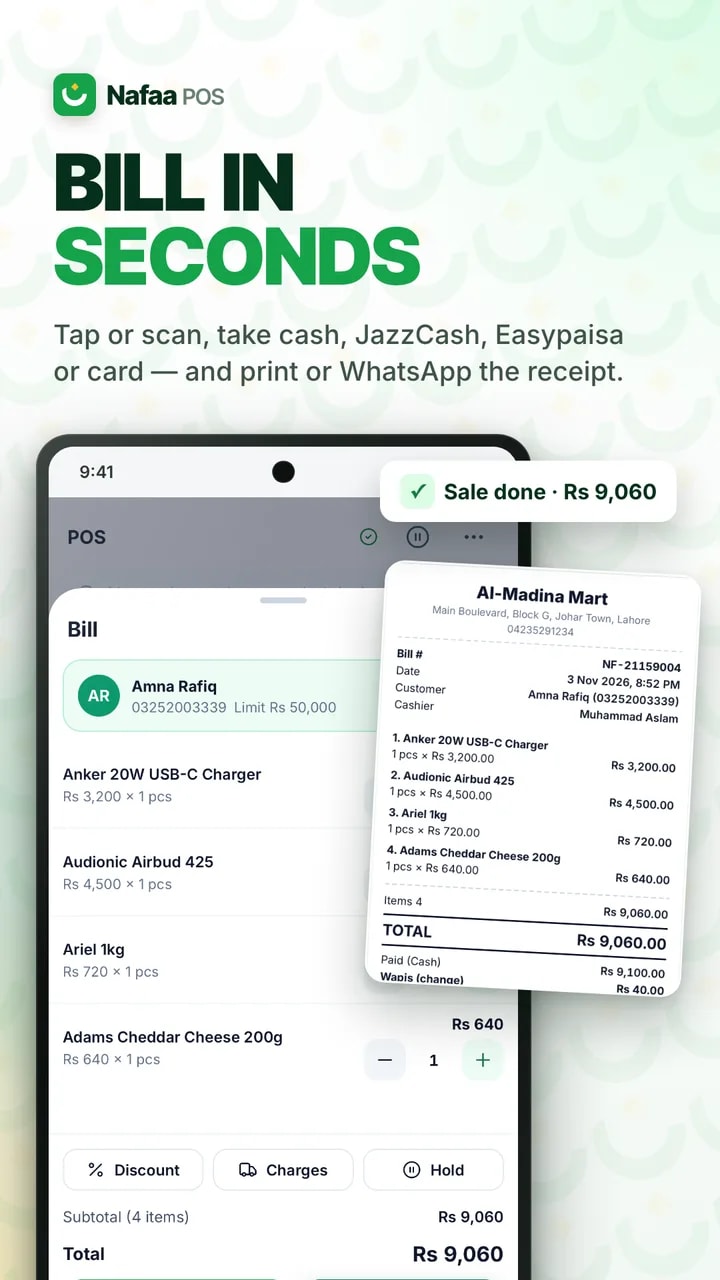
Tap products or scan the barcode with the camera. Cash, JazzCash, Easypaisa, card, bank and split payments, discounts, held bills and returns.
Works offline
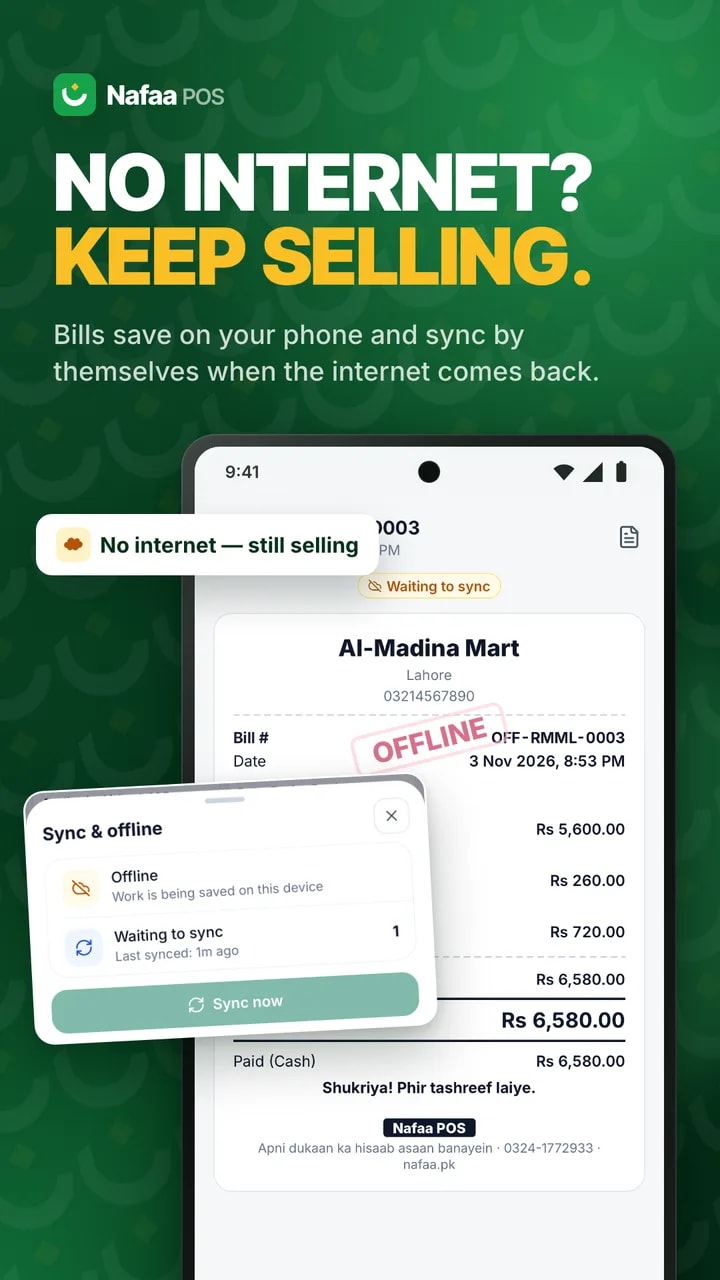
Bills, stock and khata are saved on the phone and sent by themselves when the internet is back.
Khata and udhaar
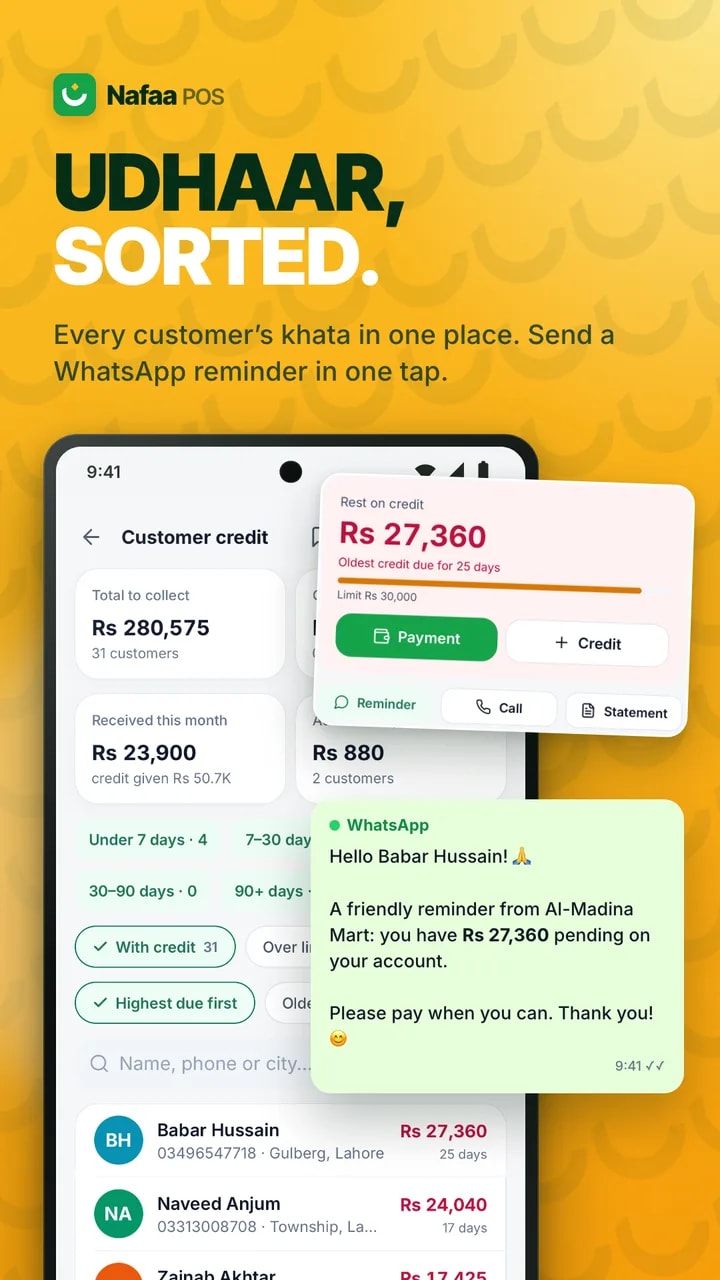
Every customer's balance, credit limit and statement, with a WhatsApp reminder in one tap.
Stock and barcode
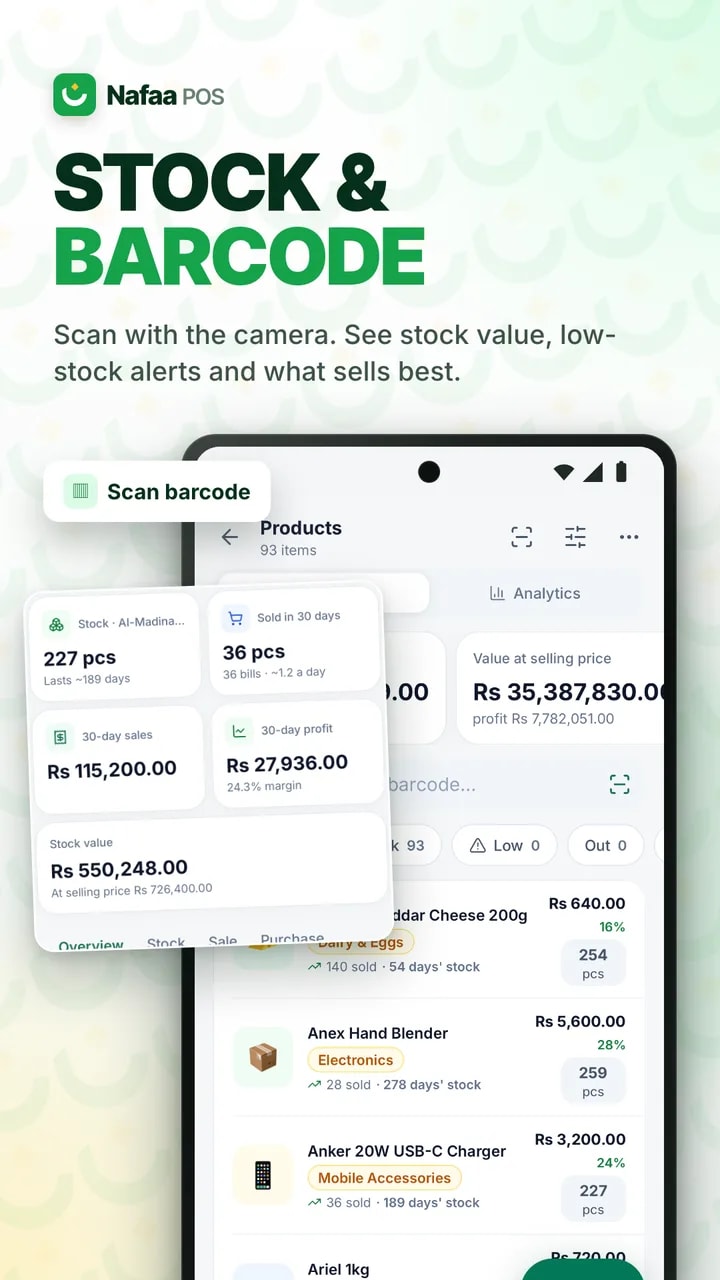
Products, packs and variants, stock value, low-stock lists, purchases, suppliers and transfers.
Profit and reports
Today's sale, profit and a daily target on Home; day report, profit and loss, expenses and cash register.
Online orders
Website and channel orders, COD confirmation, courier tracking and advance bookings in one desk.
Alerts on the phone
New sales, payments, low stock, online orders and a morning summary as push notifications.
Nafaa AI
Ask about your business in your own words and get the answer from your own numbers.
Live support
Chat with the Nafaa team from inside the app when you need help.
Bill in seconds
The counter on the phone works like the web counter: search or scan, change the quantity, add a discount or a charge, choose the customer and take the payment. Print the receipt through the phone's print service, share it as a PDF, or send it on WhatsApp.
No internet? Keep selling
Products, stock, customers and the last 30 days of bills live on the phone. A bill made offline takes stock off and adds to the khata at once, and waits in the sync list. When the connection returns it is sent with its own key, so it is never saved twice, and anything that needs your attention shows as a sync issue in plain words.
Udhaar, sorted
See who owes the most and since how many days, open a customer's statement, take a payment, or send a polite WhatsApp reminder with the exact balance. New customers made offline are created on the server when the phone syncs, together with their bills.
Stock and barcode
Scan with the camera to find a product, check its stock in each branch, see what is running low and what sells best. Purchases from suppliers, stock adjustments and transfers between branches are all on the phone.
Profit, every day
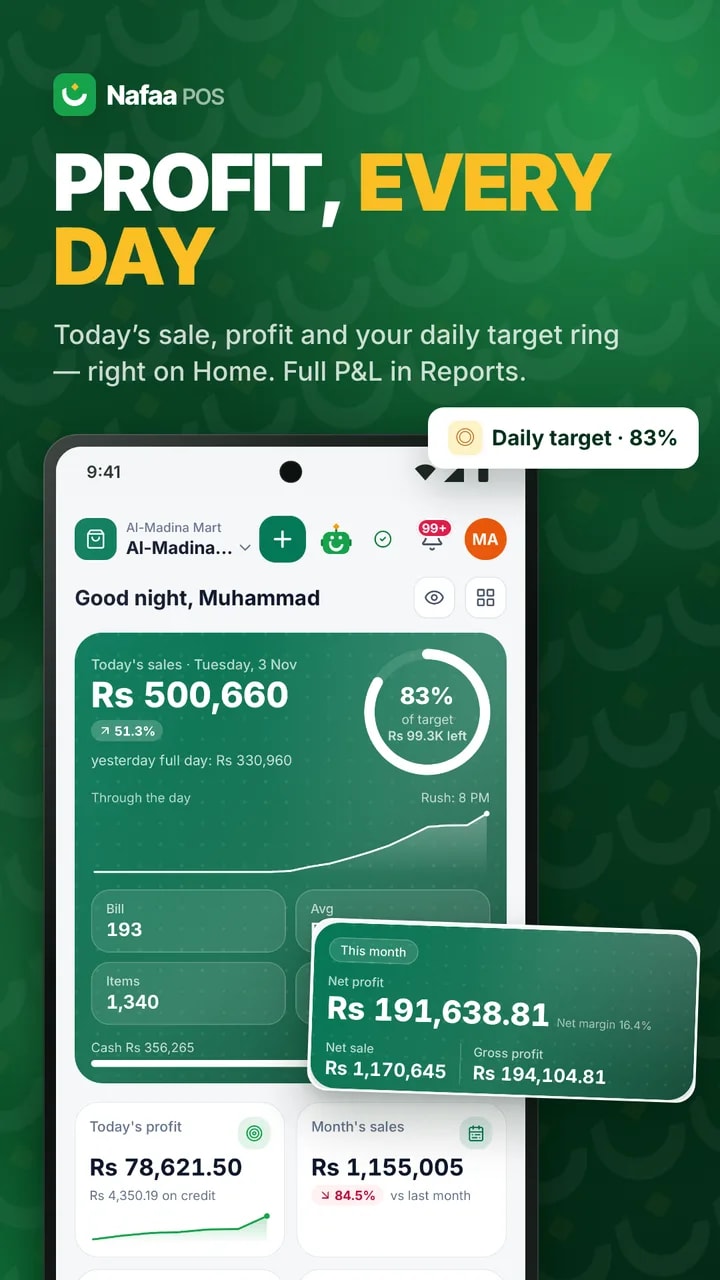
Home shows today's sale, the bills, items sold and given on credit, the profit and a ring for your daily target. The full profit and loss, expenses, other income and the day report are one tap away.
Made for your kind of business
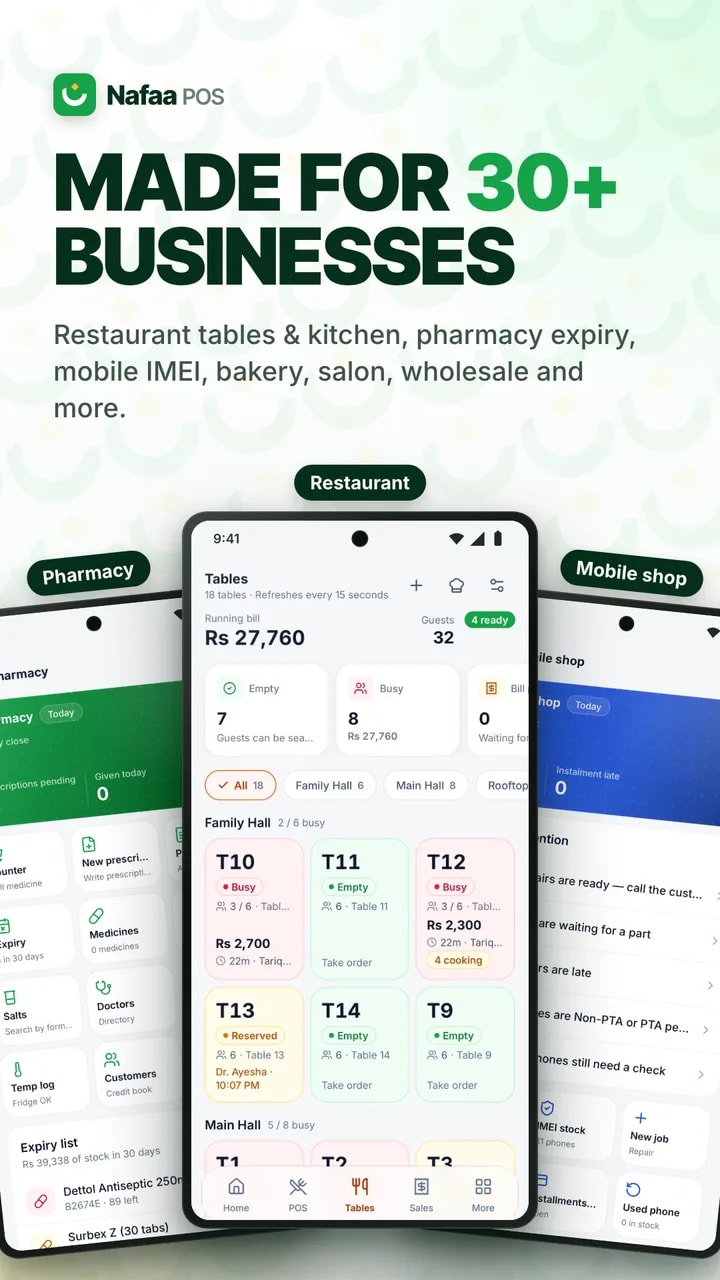
The app has screens for 30 business types: restaurant tables and kitchen, pharmacy batches and expiry, mobile shop IMEI and repairs, bakery orders, salon and clinic bookings, and more. Wholesalers get the order booker, delivery and van sales screens in the same app.
How the offline engine works
Most shops in Pakistan lose the internet at some point in the day: load shedding, a weak signal in the market, or a phone package that ran out. The Nafaa app is built so that none of this stops a sale.
- Everything you sell from is on the phone. The first sign-in downloads your products (with packs, variants and every barcode), branch stock, customers with their khata balance, categories, staff, counter rules, receipt settings and the last 30 days of bills. After that only changes are downloaded.
- Every change waits safely in a queue. A bill, a new customer or a khata payment made offline goes into a queue on the phone. The app sends it as soon as it can: when it opens, when the connection comes back, every few minutes while online, and right after each change.
- Nothing is sent twice. Each queued change carries its own key, and the server answers each key once. If the answer is lost on the way, a resend does not create a second bill.
- Nothing is dropped silently. If the server cannot accept something, for example the stock ran out on another counter or a rule needs a manager PIN, it shows as a sync issue in plain words. You can fix and retry, or discard it, and the phone puts stock and khata back as they were.
Counter rules such as credit limits and discount limits are checked on the phone before the bill is saved, using the same rules as the server, so an offline bill follows the shop's rules too. Read more on the offline POS page.
Android and iPhone
On Android, install Nafaa POS from Google Play, create your business account in the app or sign in to the one you already have, and start billing.
On iPhone and iPad, the app is for signing in to an existing Nafaa account. Create the account at nafaa.pk or in the Android app first, then sign in on the iPhone with the same login. Your plan, products and customers are already there.
One account on every device
The phone, the web app in any browser and the Windows desktop app share one Nafaa account. The owner can check today's sale on the phone while the cashier bills on the shop computer; a price changed on the computer reaches the phone at the next sync; a bill made on the phone appears in the reports everywhere. Staff log in with their own accounts and see only what their role allows, and an owner with several branches can switch between them in the app.
Getting the app on a phone
If you are reading this on a computer, open nafaa.pk/mobile-app on your phone, or search for Nafaa POS in Google Play or the App Store, and tap the button for your phone. When the app opens, pick your language first: English, Urdu or Roman Urdu. You can change it later in Settings.
How it works
Start with the app in four steps
- 1
Install
Get Nafaa POS from Google Play on Android, or from the App Store on iPhone and iPad.
- 2
Sign in
Create your account in the Android app or at nafaa.pk, or sign in with the account you already have.
- 3
Add products
Scan barcodes with the camera, import from Excel on the web, or pick ready products from the product library for your type of business.
- 4
Make your first bill
Open POS, add items, take the payment and send the receipt on WhatsApp.
Online orders on the go
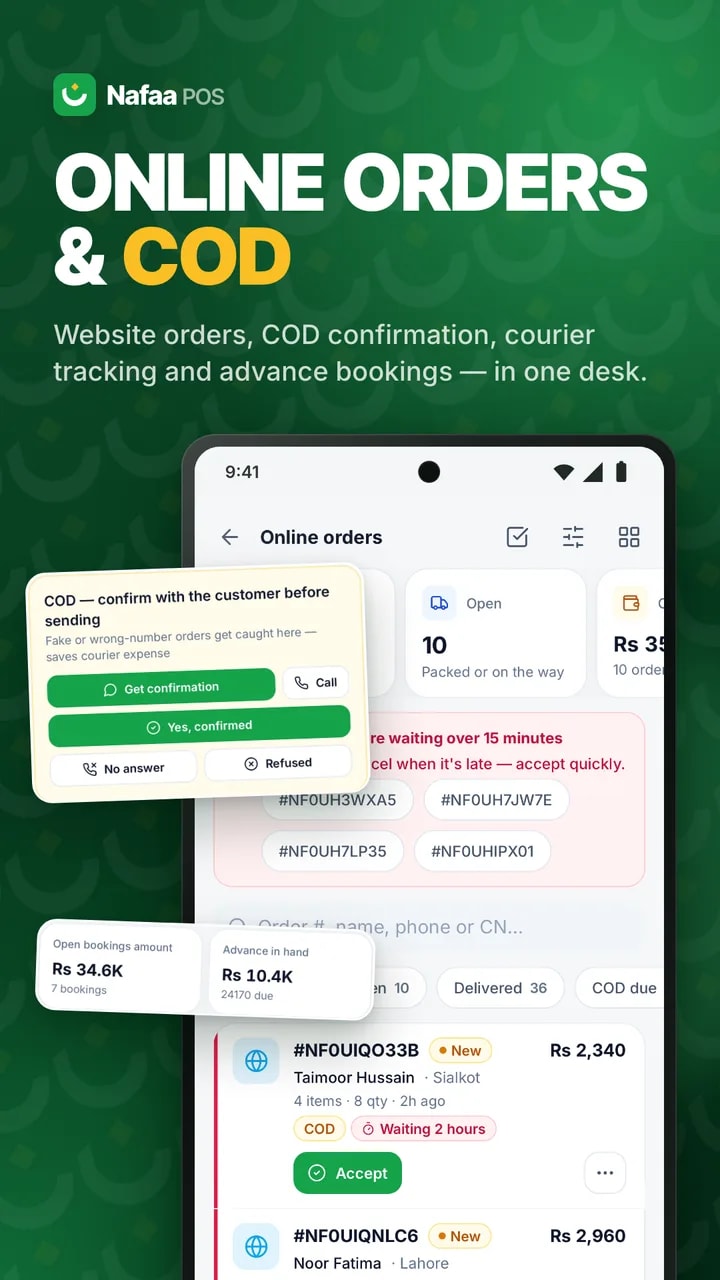
Online orders from your website and other channels arrive on the phone with a push alert. Confirm cash-on-delivery orders with the buyer, accept, track the parcel with the courier and see COD still to collect, without opening the computer. See the online store for everything that runs behind it.
Phone, computer or both
| Feature | Nafaa POS app | Web or desktop app |
|---|---|---|
| Billing at a small counter | Yes, with the camera as a scanner | Yes, with a USB scanner and thermal printer |
| Checking sale and profit away from the shop | Yes, on Home and in reports | Yes |
| Khata reminders on WhatsApp | Yes, one tap from the customer | Yes |
| Order booking in the market | Yes, the booker screens work offline with GPS check-in | Office side: orders, load sheets, settlement |
| Bulk work: Excel import, labels, long reports | Possible | Easier on a big screen |
Common questions
Is the Nafaa mobile app free?
The app is free to download from Google Play and the App Store. It uses your Nafaa account, so the plan you already have on Nafaa covers the app too. There is no separate charge for using Nafaa on a phone.
Does the app work without internet?
Yes. Products, stock, customers, khata balances and the last 30 days of bills are kept on the phone. Bills you make offline are saved on the phone and sent by themselves when the connection returns. Each bill is sent with its own key, so a resend never makes a second bill, and anything the server cannot accept shows up as a sync issue in plain words instead of being dropped.
Can I create a new account in the iPhone app?
On iPhone and iPad the app is for signing in to an existing Nafaa account. Create your account at nafaa.pk or in the Android app first, then sign in on the iPhone with the same login. Your plan, products, customers and khata are already there when you sign in.
Is the data on the app the same as on the computer?
Yes. The phone, the web app and the Windows desktop app all use one Nafaa account, so a bill made on the phone appears in the reports on the computer, and a price changed on the computer reaches the phone at the next sync. The app syncs when it opens, when the connection comes back and every few minutes while online.
Can I print bills from the phone?
Yes. The app prints the bill through the phone's own print service (AirPrint on iPhone, the print service on Android), in the same receipt design as the web app. You can also share the bill as a PDF, or send it to the customer on WhatsApp as text.
What notifications does the app send?
The app can alert you to new sales, payments received, low and out-of-stock items, returns, new customers, stock transfers, cash register open and close, credit alerts, online orders and your morning summary. Each person chooses which alerts they want, and whether to be told about their own actions too.

Watch the guide
Nafaa mobile app on iPhone and Android
Logging in on your phone, making a bill, products, udhaar and reports in the Nafaa mobile app.
6 min · Urdu voice, English subtitles
Video page: Nafaa mobile app on iPhone and AndroidAll video guides
Related
Offline POS
Nafaa keeps billing when the internet drops. Products, prices and customers are kept on the device, new sales, khata payments, customers and expenses wait in an offline queue, and everything syncs to your account on its own when the connection returns, with a Sync Center that shows what is still waiting.POS & Billing
Nafaa POS is the billing counter for any business: scan a barcode or tap a quick key, sell by piece, dozen or carton, take cash, card, JazzCash, Easypaisa or khata in one bill, print or WhatsApp the receipt, and keep billing when the internet drops. It runs on the phone, tablet or computer you already have.Digital Khata
Nafaa Digital Khata replaces the paper udhaar register: every credit sale lands in the customer's khata from the counter, payments and old balances are recorded, balances are grouped by age, credit limits stop runaway udhaar, and a WhatsApp reminder goes out in one tap.Inventory
Nafaa Inventory keeps stock right in every unit and every branch: products with cost, price and margin, barcodes and labels, combos, low-stock alerts, damage and adjustments with reasons, stock transfers between branches, and a full movement history. Import from Excel or paste from a spreadsheet, and change many prices at once in the bulk editor.Ready Product Library
The Nafaa product library gives every type of business a ready-made product list to start from: more than 21,000 medicines from the DRAP price index for pharmacies, a grocery list with barcodes, and starter lists for 23 other trades. Search, tick what you sell and Nafaa creates the products in minutes.Nafaa in English, Urdu and Roman Urdu
Nafaa works in three languages: English, Urdu in right-to-left script, and Roman Urdu. Each person picks their own language for their screens on the web, desktop and mobile app, and Nafaa AI answers in the language you use. Business words like Sale, Profit and Stock stay in the words shops already use.Wholesale & Distribution
Nafaa for wholesalers and distributors runs the whole trade cycle: order bookers take orders on their phones, even offline, the office approves them into invoices, load sheets go out by route, delivery staff deliver and collect, and the evening settlement closes every rupee. Price lists, schemes, credit limits, recoveries, vans, market returns, claims and targets are built in.
Get Nafaa POS on your phone
Search for Nafaa POS, or tap the button for your phone. On iPhone, sign in with an account made at nafaa.pk or on Android.
- 7 din Free Trial
- Keeps billing offline
- Help on WhatsApp