Updated
ProductProduct library
Your product list, ready before your first bill
Typing hundreds of products by hand is the slowest part of starting any POS. Nafaa ships ready-made lists for every kind of business. Search the list for your trade, tick what you sell, choose the branch and opening stock, and the products are created for you.
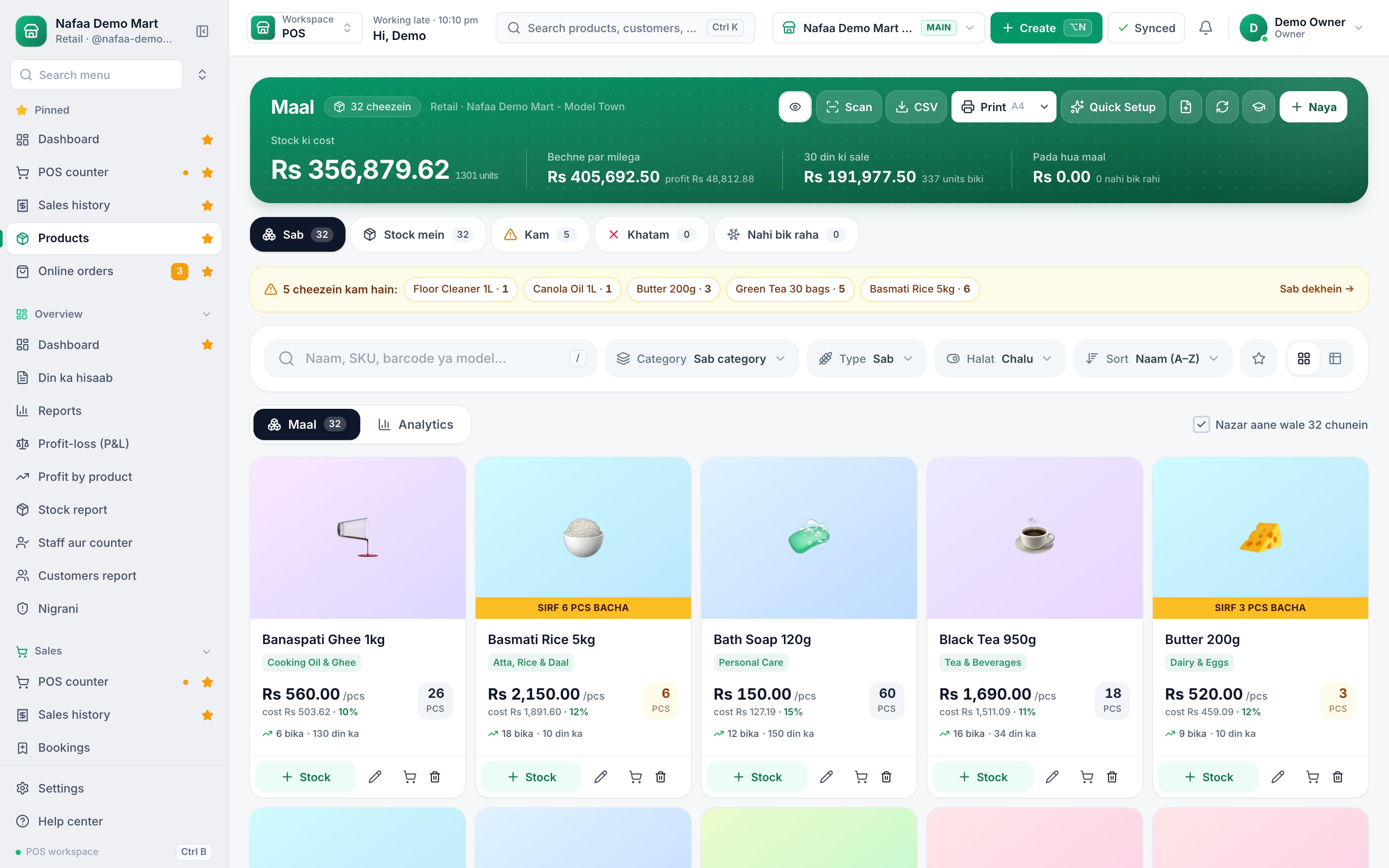
- DRAP medicines with salts
- Grocery barcodes
- 25 ready lists
- 7 din Free Trial
- Keeps billing offline
- Help on WhatsApp
- English, Urdu and Roman Urdu
- Phone, tablet or computer
The library in short
The Nafaa product library gives every type of business a ready-made product list to start from: more than 21,000 medicines from the DRAP price index for pharmacies, a grocery list with barcodes, and starter lists for 23 other trades. Search, tick what you sell and Nafaa creates the products in minutes.
Roman Urdu mein
Har karobar ke liye tayyar products ki list: pharmacy ke liye DRAP ki 21 hazar se zyada dawaiyan formula aur MRP ke saath, grocery barcode ke saath, aur baqi trades ki starter lists. Chunein, add karein, aur bechna shuru karein.
Key facts
- Pharmacy
- 21,785 medicines from the DRAP Pharmaceutical Product Price Index, with salts, strength, pack, company and MRP
- Grocery
- 1,720 items, 1,069 of them with barcodes
- Other trades
- Starter lists for 23 more business types, with estimated prices
- Import
- Pick items, choose branch and opening stock; nothing you already have is created twice
Features
What is in the library
Medicines from DRAP
Brand, salts and strength, form, pack, company, registration number and the DRAP MRP for every medicine.
Grocery with barcodes
Pakistani grocery items with barcodes and pictures where they are known, so scanning works from day one.
Starter lists for trades
Hardware, garments, shoes, mobile, auto parts, cosmetics, bakery and more, with categories and units.
Your margin, your cost
Set a margin and Nafaa works out cost from the price, or type your own prices before you add.
No duplicates
Items already in your products are marked "Added" and are not created again.
Scan to find
Scan a barcode into the search box; if the library knows it, that item shows up.
Ready lists by business type
| Feature | Items | Notes |
|---|---|---|
| Pharmacy | 21,785 | DRAP price index: salts, strength, form, pack, company, reg. no, MRP |
| Grocery and general store | 1,720 | 1,069 with barcodes; some items need your price before adding |
| Cosmetics | 406 | Includes beauty items with barcodes |
| Shoes | 300 | Estimated prices |
| Garments | 288 | Estimated prices |
| Auto parts | 261 | Estimated prices |
| Hardware | 254 | Estimated prices |
| Stationery and books | 216 | Estimated prices |
| Mobile shop | 200 | Estimated prices |
| Dairy, sports, electronics | 167, 165, 164 | Estimated prices |
| Agri, pet shop, toys | 154, 156, 156 | Estimated prices |
| Appliances, restaurant, bakery | 148, 145, 124 | Estimated prices |
| Salon, optical, furniture | 117, 107, 101 | Estimated prices |
| Jewelry, florist, meat, carpet | 99, 95, 92, 82 | Estimated prices |
How it works
From empty shop to ready counter
- 1
Open the library
Go to Products and open the library. It opens on the list for your business type; you can look at the other lists too.
- 2
Search and tick
Search by name, brand, category or barcode. Pharmacies can also search by formula, company or registration number. Tick one item or a whole page.
- 3
Set price and stock
Choose the margin or type your own price, pick the branch, and add an opening stock if you want one (otherwise stock starts at zero).
- 4
Add and sell
Nafaa creates the products in the background and shows how many were made, skipped or need a price. They are ready on the POS at once.
Built for pharmacies first
A pharmacy can carry thousands of medicines, and the same salt comes from many companies. The pharmacy list comes from the DRAP Pharmaceutical Product Price Index, the Drug Regulatory Authority of Pakistan's public list of registered medicines and their maximum retail prices, copied in November 2026. Each medicine keeps its salts and strength, so when you add it to your shop Nafaa also knows which medicines share the same formula.
That pays off at the counter. When a customer asks for a brand you are out of, the Same formula button on the bill line shows the other medicines with the same salts and strength that you stock, with their price, so you can offer a substitute or add it in one tap. Cost is worked out as the MRP minus your margin (15% unless you change it), and you can always edit the cost and price of any product afterwards. Prices change, so check the MRP on the pack before you sell, and see the pharmacy page for batches, expiry and the rest of the pharmacy tools.
Grocery with barcodes
The grocery list covers the everyday items of a Pakistani kiryana store: tea, milk, oil, spices, snacks, soap and more. Barcodes and pictures come from Open Food Facts, an open database shared under the ODbL licence, so most packed items scan straight away. A few items in the list have no price yet; the app asks you to type one before they are added.
Starter lists for every other trade
For hardware, garments, shoes, mobile shops, auto parts, cosmetics, bakery, dairy and the other trades in the table above, the library has a starter list of common items with categories and units. These prices are estimates to save typing, and the app labels them "Andaza price". Treat them as a first draft: tick what you sell, set your own margin, and correct prices as you go.
When you have your own list
If your products are already in Excel or another system, the bulk import on the web brings them in with a dry run first. Many shops do both: import their own list, then fill the gaps from the library. Our team can also help as part of data migration.
Common questions
What is the Nafaa product library?
It is a set of ready-made product lists, one for each kind of business. Instead of typing every product, you search the list for your type of shop, tick what you sell, choose the branch and opening stock, and Nafaa creates the products. Items you already have are not created twice.
Where do the medicine names and prices come from?
The pharmacy list is taken from the DRAP Pharmaceutical Product Price Index (e.dra.gov.pk/public/price), copied in November 2026. Each medicine has its brand name, salts and strength, form, pack, company, registration number and the MRP listed by DRAP. Cost is worked out as MRP minus a margin you set (15% unless you change it). Always check the price on the pack before you sell.
Are the prices in the other lists exact?
No. Outside the pharmacy list, prices are estimates to get you started, and the app marks them as "Andaza price". Change them to your own buying and selling prices before you start billing, or set a margin when you add the products.
Industries using it
Pharmacy & Medical Store
Nafaa is software for pharmacies and medical stores in Pakistan: search medicines by salt or formula and find substitutes, track batches and expiry, keep prescriptions and doctors, record controlled and narcotic sales in a register with patient and doctor details, and log fridge temperatures for the cold chain.Kiryana & Grocery Store
Nafaa is POS and khata software for kiryana and grocery stores in Pakistan. Scan barcodes at the counter, sell by piece, dozen or carton, keep every customer's udhaar in a digital khata with WhatsApp reminders, import products from Excel, and keep billing when the internet drops.Hardware & Building Materials
Nafaa runs hardware and building material shops: items by size and shade, retail, contractor and bulk rates, quotations that turn into bills, delivery challans, contractor sites with their own khata, brands, and reorder rules that flag what to buy before it runs out.Cosmetics & Beauty Shop
Nafaa runs cosmetics and beauty shops that sell makeup, skincare, fragrance and haircare: brands and shades, batch expiry, tester records, deals and gift sets, and a loyalty programme for regular customers, with the counter, stock and khata built in. It runs in the browser on a phone, tablet or computer.Garments & Boutique
Nafaa runs garment shops and boutiques that sell ready-made and custom-stitched clothes: stock by size and colour, tailoring (silai) orders, alterations, saved customer measurements, items put on hold, qist plans, exchanges, collections and size charts, alongside the counter, khata and reports.
Related
Data Migration to Nafaa
Our team moves your business into Nafaa from Excel, a paper register or another POS: products with prices, cost, barcodes and stock, customers with their old udhaar as opening khata balances, and suppliers with what you owe them, all cleaned and checked with you before go-live.Nafaa POS Mobile App
The Nafaa POS app for Android and iPhone runs your business from the phone: billing with the camera as a barcode scanner, stock, khata with WhatsApp reminders, profit and reports, online orders and alerts. It keeps billing without internet and syncs by itself, in English, Urdu or Roman Urdu.
More from Nafaa
Inventory
Nafaa Inventory keeps stock right in every unit and every branch: products with cost, price and margin, barcodes and labels, combos, low-stock alerts, damage and adjustments with reasons, stock transfers between branches, and a full movement history. Import from Excel or paste from a spreadsheet, and change many prices at once in the bulk editor.POS & Billing
Nafaa POS is the billing counter for any business: scan a barcode or tap a quick key, sell by piece, dozen or carton, take cash, card, JazzCash, Easypaisa or khata in one bill, print or WhatsApp the receipt, and keep billing when the internet drops. It runs on the phone, tablet or computer you already have.Digital Khata
Nafaa Digital Khata replaces the paper udhaar register: every credit sale lands in the customer's khata from the counter, payments and old balances are recorded, balances are grouped by age, credit limits stop runaway udhaar, and a WhatsApp reminder goes out in one tap.FBR & PRA Invoicing
Nafaa is an FBR & PRA approved POS integrator. Every sale can be reported to FBR, PRA, SRB or KPRA from the counter, the fiscal invoice number and QR code print on the receipt, failed invoices retry by themselves, and tax reports are ready for your return.
Start with a ready list
Start the 7-day free trial, open the product library and have your counter ready today.
- 7 din Free Trial
- Keeps billing offline
- Help on WhatsApp