- Fact-checked
- Updated
Compare
Nafaa vs Zoho Inventory
Zoho Inventory is cloud inventory and order management for businesses that sell across channels and ship orders, priced in US dollars by orders, users and locations. Nafaa is a POS-first system for Pakistani shops, with stock, khata and purchasing built around the counter. This page compares them and says when Zoho Inventory is the better choice.
Which one should you choose?
Zoho Inventory is cloud inventory and order management for businesses that sell across channels and ship orders, priced in US dollars by orders, users and locations. Nafaa is a POS-first system for Pakistani shops, with stock, khata and purchasing built around the counter. This page compares them and says when Zoho Inventory is the better choice.
Roman Urdu mein
Zoho Inventory online orders, godaam aur parcel bhejne ke liye hai. Nafaa counter wali dukaan ke liye hai, jahan har bill ke saath Stock, udhaar aur galla badalta hai.
Key facts
- Short answer
- Zoho Inventory for order fulfilment and warehouses; Nafaa for a counter where stock, udhaar and cash move with every bill.
- Choose Zoho Inventory if
- You sell mainly through online channels and ship parcels, manage bins and warehouses, and use Zoho Books.
- Choose Nafaa if
- You serve walk-in customers, give udhaar, take JazzCash and Easypaisa, and sell online from the same stock.
- Zoho Inventory price
- Free plan (50 orders); paid from US$29 per organisation per month billed yearly (zoho.com, 23 Nov 2026)
- Nafaa price
- Paid plans from Rs 1,500 a month, after a 7-day free trial
At a glance
Nafaa
- Price
- Paid plans from Rs 1,500 a month See pricing
- Free trial
- Free
Zoho Inventory
- Website
- zoho.com
Written by the Nafaa team. Competitor details come from their own pages and are dated; tell us if something has changed and we will update it. Last checked: .
What each one is
Zoho Inventory is built around orders. Its feature list covers purchase orders and receiving, multi-warehouse management, transfer orders, picklists, bin locations, backorders and dropshipping, packaging and shipping with tracking, serial and batch tracking, price lists, barcodes and sales returns. It connects to Etsy, Shopify, WooCommerce and Zoho Commerce, to Zoho Books, Xero and QuickBooks Online, and to carriers such as UPS and FedEx. Plans are priced in US dollars per organisation and grow by orders per month, users and locations. A free plan allows 50 orders, one user and two locations. Zoho sells point of sale separately as Zoho POS, whose site says you can "bill offline when your internet connectivity is down" and sync later.
Nafaa starts at the counter. Each bill takes stock off the shelf, records the money by method and puts udhaar in the customer's khata. Purchases add stock and track supplier balances, branches transfer stock between them, and stock counts show the difference between system and shelf. With the online add-ons, orders from your own store, Shopify, WooCommerce and Daraz come into the same stock.
Nafaa and Zoho Inventory side by side
| Feature | Nafaa | Zoho Inventory |
|---|---|---|
| Built for | Counter sales with stock, khata and cash | Order management, warehouses and shipping |
| Point of sale | Included: barcode, quick keys, printer, drawer, offline billing | Not part of Zoho Inventory; Zoho POS is a separate product |
| Pricing model | Monthly plan per business, in rupees | Per organisation per month in US dollars, by orders, users and locations |
| Entry plans | From Rs 1,500 a month after a 7-day free trial | Free: 50 orders, 1 user, 2 locations; Standard US$29 a month billed yearly: 500 orders, 2 users, 2 locations |
| Batches and serials | Batches with expiry, and serial or IMEI numbers in the relevant industry packs | Serial and batch tracking from the Professional plan (US$79) |
| Customer udhaar | Khata from the bill, credit limits, WhatsApp reminders | Invoices and receivables |
| Online channels | Own store, Shopify, WooCommerce and Daraz (add-ons) | Etsy, Shopify, WooCommerce, Zoho Commerce and more |
| Shipping | Pakistani couriers such as PostEx, Leopards, Trax and TCS | UPS, FedEx, Easyship and other carriers |
| Accounting link | Daily journal to Zoho Books, QuickBooks Online or Xero; Tally file (Accounting add-on) | Zoho Books, Xero and QuickBooks Online |
| Support | WhatsApp, phone and email, in Urdu or English | Free support 24/5; premium support plan available |
Sources
- Zoho Inventory (features and integrations) · Zoho · Accessed
- Zoho Inventory pricing (plans, orders, users, locations) · Zoho · Accessed
- Zoho POS (separate point of sale product) · Zoho · Accessed
Checked on
When Zoho Inventory is the better choice
- Most of your sales are shipped orders. Picklists, packages, bins, backorders and dropshipping are core to Zoho Inventory. Nafaa handles online orders and couriers, but it is not a warehouse management system.
- You run large warehouses with bin locations. Zoho's Premium plan lists 2,000 bins per location.
- You sell on international marketplaces such as Etsy, or ship abroad with UPS or FedEx.
- You already use Zoho Books, CRM or other Zoho apps. Staying in one family of apps keeps logins and data together.
- You need multi-currency transactions per contact, which Zoho lists on its Enterprise plan.
When Nafaa is the better choice
- You have a counter. Zoho Inventory does not include a POS; you would add Zoho POS or another system. Nafaa's POS is the centre of the product and keeps billing without internet.
- Order limits do not fit counter trade. A busy kiryana store makes hundreds of bills a day. Nafaa plans are not priced by number of orders.
- Udhaar and local wallets. Nafaa has a khata on every bill and treats JazzCash and Easypaisa as their own payment methods.
- Local couriers. Nafaa connects to Pakistani couriers, so cash-on-delivery parcels and returns are tracked against your stock. See Online store.
- Rupee pricing and Urdu support.
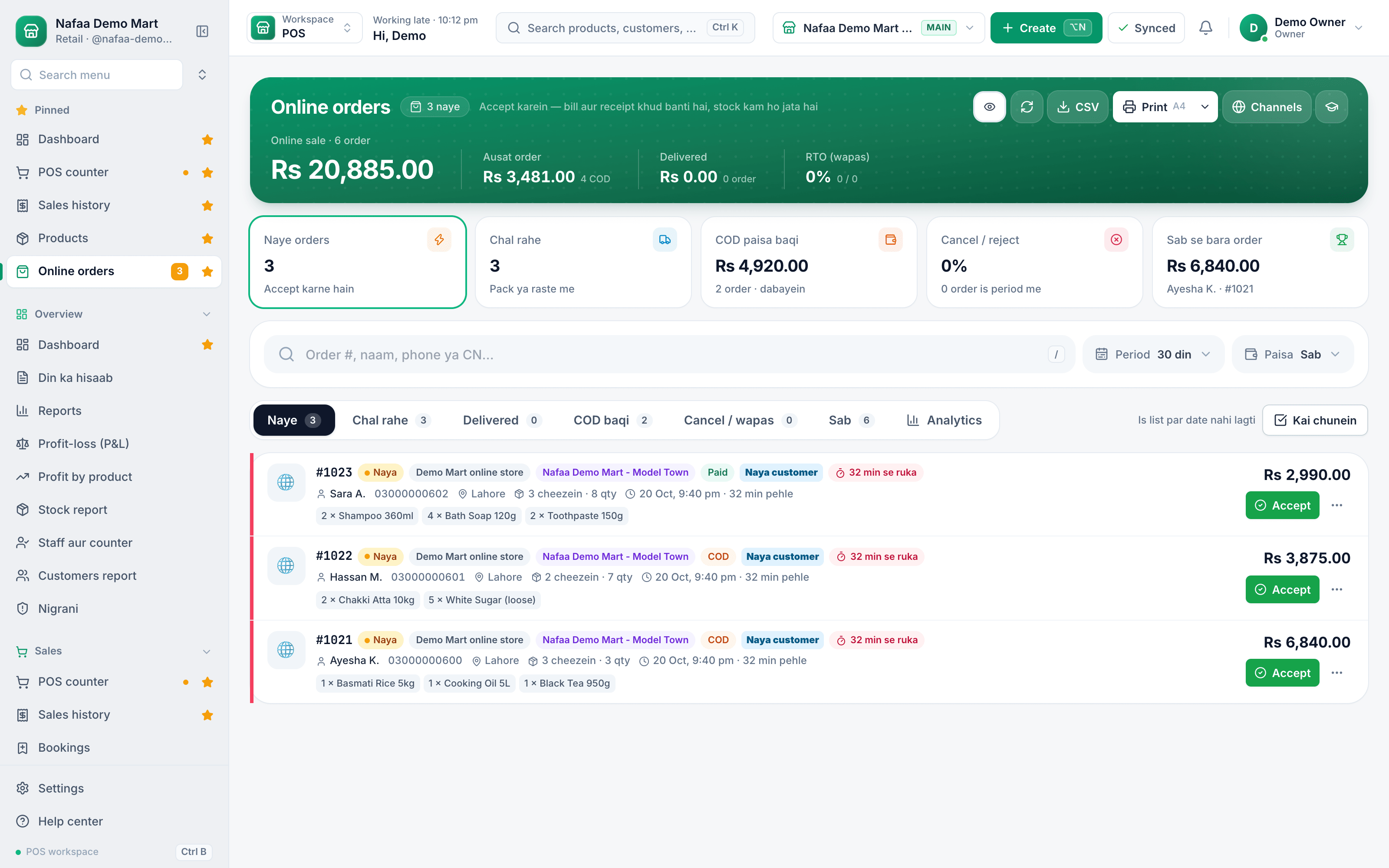
Online and counter orders on one stock
Orders from your website, Shopify, WooCommerce and Daraz arrive next to counter sales, so the stock you show online is the stock on your shelf.
Using Nafaa with Zoho Books
If your accountant uses Zoho Books, you can run the counter on Nafaa and keep the books in Zoho. With the Accounting add-on, Nafaa connects to Zoho Books and sends one balanced journal a day with sales by payment method, udhaar given and collected, Discounts, refunds and expenses, and optionally cost of goods sold. Each line is mapped once to an account in Zoho Books. That gives the accountant clean daily totals without every bill.
A note on order limits
Zoho Inventory plans count orders per month: 50 on the free plan, 500 on Standard, 3,000 on Professional, 7,500 on Premium and 15,000 on Enterprise, according to its pricing page. A shop billing 200 walk-in sales a day makes about 6,000 bills a month. Whether counter bills count against these limits depends on how you connect a POS, so ask Zoho before you plan around them.
How to decide
Step 1: Count your sales by channel
How many are counter bills, and how many are shipped orders?
Step 2: List what the warehouse needs
Bins, picklists and packages point to Zoho Inventory; shelves and a stock room point to Nafaa.
Step 3: Check your accountant's software
Both connect to Zoho Books, QuickBooks Online and Xero.
Step 4: Price a full year
Zoho in US dollars by orders, users and locations; Nafaa by plan in rupees.
Step 5: Trial both
Run a week of real sales and a stock count in each.
More comparisons
- Compare
Nafaa vs Tally
Nafaa is counter-first software for Pakistani businesses: POS billing, stock, khata and reports. TallyPrime is business management software built around accounting, inventory and tax filing. This page compares them fairly, says when Tally is the better choice, and shows how the two can work together.
- Compare
Nafaa vs Excel
Many shops start with a spreadsheet, and Excel is a very good one. This page compares running a shop in Excel with running it in Nafaa: billing at the counter, stock that updates on each sale, udhaar, several staff and backups. It says honestly when a spreadsheet is enough, and shows how to bring your Excel lists into Nafaa.
- Compare
Nafaa vs DigiKhata
DigiKhata is a free bookkeeping and khata app with ledgers, cash book, stock book, staff book, card acceptance on the phone and small business loans. Nafaa is a POS-first system where udhaar, stock and staff hang off the bill at the counter. This page compares them fairly and says when DigiKhata is the better choice.
- Compare
Nafaa vs Udhaar Book
Udhaar Book, which its App Store listing says is now called Rupin, is a free khata, cash book and payments app with a business wallet, mobile load and bill payments. Nafaa is a POS-first system for running a counter, stock and udhaar together. This page compares them and says when Udhaar Book is the better pick.
- Compare
Nafaa vs Loyverse
Loyverse is a free POS used worldwide, with paid add-ons for longer sales history, employee management and advanced inventory. Nafaa is a paid POS built for Pakistan, with khata, JazzCash and Easypaisa, rupee pricing and purchasing in the product. This page compares them for a Pakistani shop and says plainly when Loyverse is the better choice.
- Compare
Nafaa vs Oscar POS
Oscar is a Pakistani POS for restaurants, retail, grocery, salons, pharmacies and more, with its own card device, a wallet, online ordering and accounting. Nafaa is a POS for the same kinds of business, with udhaar and offline billing at its core. This page compares the two from their own pages and says where Oscar fits better.