- Fact-checked
- Updated
Alternatives
A Tally alternative for the shop counter
Many shops in Pakistan bill from Tally because their accountant set it up. Tally is strong accounting software, but a counter with a queue needs a tool built for billing, udhaar and stock. This page explains when to replace Tally at the counter, when to keep it for the books, and how to use both.
Do you need a Tally alternative?
Many shops in Pakistan bill from Tally because their accountant set it up. Tally is strong accounting software, but a counter with a queue needs a tool built for billing, udhaar and stock. This page explains when to replace Tally at the counter, when to keep it for the books, and how to use both.
Roman Urdu mein
Tally ko accountant ke hisaab ke liye rakhein. Counter par bill, udhaar aur Stock ke liye POS behtar hai, aur Nafaa har din ka voucher file Tally ko de deta hai.
Key facts
- Short answer
- Replace Tally at the counter, not in the accounts. Bill on a POS and send the day's vouchers to Tally.
- Why shops switch
- Faster billing, udhaar from the bill, stock on the shop floor, and access from a phone
- Keep Tally for
- Ledgers, financial statements, and the work your accountant already does in it
- How they connect
- With the Accounting add-on, Nafaa prepares a daily Sales, Receipt and Payment voucher file for import into TallyPrime
- Nafaa price
- Paid plans from Rs 1,500 a month, after a 7-day free trial
At a glance
Nafaa
- Price
- Paid plans from Rs 1,500 a month See pricing
- Free trial
- Free
TallyPrime
- Website
- tallysolutions.com
Written by the Nafaa team. Competitor details come from their own pages and are dated; tell us if something has changed and we will update it. Last checked: .
What Tally is built for
TallyPrime is business management software centred on accounting. Its product page leads with invoicing and accounting, inventory management, banking and cash flow, and a long list of Indian tax features: GST returns, e-invoicing and e-way bills. Tally sells two editions: Silver, "suitable for businesses that need TallyPrime on a single PC", and Gold, "perfect for businesses needing multi-user access on multiple PCs", on plans from one month to a lifetime licence, with a separate TallyPrime Cloud Access service. The plan selector on the India page offers three licence types: India, International ("All Countries except North America") and North America, with prices in Indian rupees. Tally's International site lists International and SAARC licence types and advertises a lifetime licence "at USD 630". Tally's help pages describe importing masters and transactions in Excel, XML or JSON.
Accountants in Pakistan know Tally well, which is why many shops end up billing from it.
Why it is awkward at a busy counter
- Billing is a voucher entry. That is natural for an accountant and slow for a cashier with a queue.
- Udhaar is a ledger, not a khata. There are no credit limits at the counter or WhatsApp reminders sorted by age.
- It lives on the shop PC. The owner cannot see today's sale on a phone unless remote access is set up.
- Indian tax features do not apply in Pakistan. GST, e-way bills and Indian e-invoicing are not Pakistani systems.
- Staff limits are coarse. Controlling who may give a Discount or a refund at the counter needs a POS with roles.
TallyPrime and Nafaa at the counter
| Feature | Nafaa | TallyPrime |
|---|---|---|
| Built for | Counter billing, stock and khata | Accounting, inventory and tax filing |
| Billing a walk-in customer | Barcode, quick keys, print and cash in one step | Sales voucher entry |
| Udhaar | Khata from the bill, credit limits, WhatsApp reminders | Customer ledgers |
| Where it runs | Browser on any device, offline billing, Windows app | Silver on a single PC; Gold on multiple PCs; TallyPrime Cloud Access service |
| Tax features shown | Optional FBR/PRA integration | GST, e-invoicing and e-way bills (India) |
| Licence types | One plan per business, priced in rupees | India, International (all countries except North America), North America; SAARC on the International site |
| Working together | Daily voucher file for TallyPrime (Accounting add-on) | Imports masters and transactions from Excel, XML or JSON |
Sources
- TallyPrime product page (features, plans, licence types) · Tally Solutions · Accessed
- Import Data into TallyPrime (help) · Tally Solutions · Accessed
- Buy TallyPrime, International site (licence types and USD price) · Tally Solutions · Accessed
Checked on
The usual answer: both
Most shops that move off Tally at the counter keep Tally for the accountant. The cashier bills in Nafaa all day. With the Accounting add-on, at the end of each day Nafaa prepares one file with Sales, Receipt and Payment vouchers, using the ledger names your accountant gave you once: sales, Discounts, returns, cash, bank, each wallet, debtors and expense ledgers. The accountant imports it into TallyPrime and the day book matches Nafaa's day report. Nobody types the day's bills twice.
When to keep billing in Tally
- You make a few large invoices a day, for example a distributor or trader who bills companies, and the accountant does the billing anyway.
- Your accountant needs every invoice in Tally in full detail, not daily totals.
- You operate in India, where Tally's GST and e-invoicing features apply.
When a POS is the better alternative
If customers queue at your counter, buy on udhaar, pay by JazzCash or Easypaisa, and you want to see the shop from your phone, put the counter on Nafaa POS and let Tally keep the books. See Nafaa vs Tally for the full comparison.
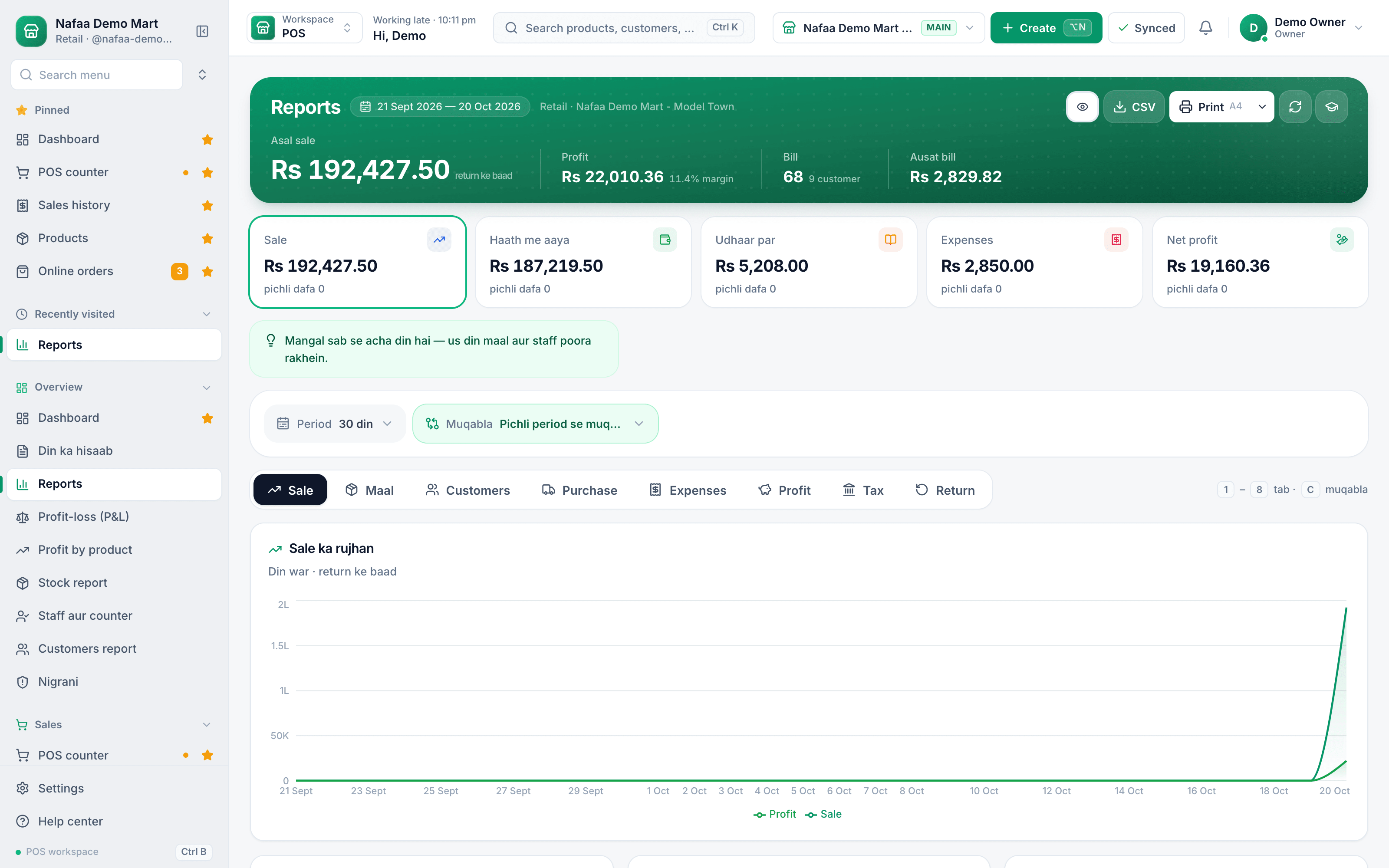
The day's figures for the accountant
Sale, Profit, Expenses and the payment split for any period, the same numbers that go into the voucher file for Tally.
Moving the counter off Tally
Step 1: Ask your accountant for ledger names
Sales, Discounts, returns, cash, bank, wallets, debtors and expenses, exactly as named in Tally.
Step 2: Put your stock items in Excel
List items with rates and quantities, with your accountant's help if they keep them in Tally, and import the file into Nafaa.
Step 3: Enter opening balances
Customer balances in the khata, supplier balances in purchasing.
Step 4: Map the ledgers in Nafaa
Enter the ledger names once in the Tally settings.
Step 5: Bill and import one day
Bill a full day in Nafaa, import the file in Tally and compare the day book.
Common questions
Does Nafaa replace Tally completely?
For most shops, no, and it does not need to. Nafaa runs the counter, stock and khata. Tally stays with the accountant for ledgers and financial statements. Nafaa prepares a daily voucher file for Tally, so the two agree and nobody types the day's bills twice.
Can TallyPrime be used in Pakistan?
Tally's plan selector lists an International licence type for "all countries except North America". Its pricing and tax features on the product page are written for India, so ask Tally or a local partner about the International licence and support before you buy.
How does the Tally file from Nafaa work?
Nafaa builds one file per day with Sales, Receipt and Payment vouchers, using the ledger names you map once in its Tally settings. Your accountant imports it into TallyPrime and checks the day book against Nafaa's day report. You can include cost of goods and expenses or leave them out.
More comparisons
- Compare
Nafaa vs Excel
Many shops start with a spreadsheet, and Excel is a very good one. This page compares running a shop in Excel with running it in Nafaa: billing at the counter, stock that updates on each sale, udhaar, several staff and backups. It says honestly when a spreadsheet is enough, and shows how to bring your Excel lists into Nafaa.
- Compare
Nafaa vs DigiKhata
DigiKhata is a free bookkeeping and khata app with ledgers, cash book, stock book, staff book, card acceptance on the phone and small business loans. Nafaa is a POS-first system where udhaar, stock and staff hang off the bill at the counter. This page compares them fairly and says when DigiKhata is the better choice.
- Compare
Nafaa vs Udhaar Book
Udhaar Book, which its App Store listing says is now called Rupin, is a free khata, cash book and payments app with a business wallet, mobile load and bill payments. Nafaa is a POS-first system for running a counter, stock and udhaar together. This page compares them and says when Udhaar Book is the better pick.
- Compare
Nafaa vs Loyverse
Loyverse is a free POS used worldwide, with paid add-ons for longer sales history, employee management and advanced inventory. Nafaa is a paid POS built for Pakistan, with khata, JazzCash and Easypaisa, rupee pricing and purchasing in the product. This page compares them for a Pakistani shop and says plainly when Loyverse is the better choice.
- Compare
Nafaa vs Oscar POS
Oscar is a Pakistani POS for restaurants, retail, grocery, salons, pharmacies and more, with its own card device, a wallet, online ordering and accounting. Nafaa is a POS for the same kinds of business, with udhaar and offline billing at its core. This page compares the two from their own pages and says where Oscar fits better.
- Compare
Nafaa vs CORN POS
CORN POS is a restaurant POS from Pakistan with kitchen displays, tableside ordering, a rider app, branded online ordering and franchise tools, priced per branch in dollars. Nafaa is one system for shops and restaurants alike, priced in rupees. This page compares them for a restaurant or cafe and says where CORN POS is the stronger fit.