- Fact-checked
- Updated
Alternatives
A DigiKhata alternative for shops with a busy counter
DigiKhata is a free ledger and khata app that many Pakistani businesses start with. Shops look for an alternative when the counter gets busy and entering every udhaar, sale and stock change by hand stops keeping up. This page covers the signs, what to look for, where Nafaa fits and when DigiKhata is still right.
Do you need a DigiKhata alternative?
DigiKhata is a free ledger and khata app that many Pakistani businesses start with. Shops look for an alternative when the counter gets busy and entering every udhaar, sale and stock change by hand stops keeping up. This page covers the signs, what to look for, where Nafaa fits and when DigiKhata is still right.
Roman Urdu mein
Agar kaam zyada tar khata likhne ka hai to DigiKhata theek hai. Jab counter par rush ho aur har udhaar, sale aur Stock alag se likhna mushkil ho jaye, to aisa POS lein jisme khata bill ke andar ho.
Key facts
- Short answer
- Stay on DigiKhata for ledger work; move to a POS with a built-in khata when the counter gets busy.
- Main difference
- DigiKhata records entries you type; a POS records udhaar, stock and cash from the bill itself
- What you keep
- Customer balances move over as opening balances; reminders continue on WhatsApp
- What you give up
- A free app, card tap on the phone and DigiKhata's loans
- Nafaa price
- Paid plans from Rs 1,500 a month, after a 7-day free trial
At a glance
Nafaa
- Price
- Paid plans from Rs 1,500 a month See pricing
- Free trial
- Free
DigiKhata
- Website
- digikhata.pk
Written by the Nafaa team. Competitor details come from their own pages and are dated; tell us if something has changed and we will update it. Last checked: .
Why shops look for an alternative
DigiKhata is a set of digital "books": a Party Ledger for customers and suppliers, a Cash Book, a Stock Book, a Staff Book, a Bill Book for invoices and an Expense Book, with reminders that its app listings say go by SMS and WhatsApp. Its website also offers card payments on the phone, a QR for receiving payments and small business loans. For a business that records a few entries a day, that is a lot of value in a free app.
The trouble starts when the counter gets busy. In a ledger app, the sale and the udhaar are separate steps. The cashier bills the customer on a calculator or another machine, and then someone opens the app to write the udhaar. Stock is updated separately again. On a quiet day that is fine. On a Saturday with a queue, entries get skipped, amounts are rounded, and the khata stops matching what customers really took.
Signs you have outgrown a ledger app
- Udhaar is entered at the end of the day from memory or a paper slip, not when the customer leaves.
- Customers dispute balances because the khata shows an amount but not the items behind it.
- Stock never matches the shelf, because sales are not taken off stock automatically.
- The galla is short and nobody knows why. There is no expected amount to compare the count with.
- Staff give Discounts or credit freely, because the app does not stop them.
- You opened a second counter or branch and need both to work on one set of stock.
DigiKhata and Nafaa for a busy shop
| Feature | Nafaa | DigiKhata |
|---|---|---|
| How a sale is recorded | Billed at the counter with barcode or quick keys | Invoice in the Bill Book, or a cash book entry |
| How udhaar is recorded | Chosen as the payment on the bill, with the items listed | Entry in the Party Ledger |
| Stock after a sale | Reduced by the bill | Stock Book with stock levels and low-stock warnings |
| Stopping too much credit | Credit limit per customer; over the limit needs a manager PIN | Not described on the pages checked |
| Closing the galla | Expected cash per shift against the counted amount | Cash Book with cash in hand |
| Reminders | WhatsApp reminders sorted by how old the balance is | SMS and WhatsApp reminders with templates |
| Price | From Rs 1,500 a month after a 7-day free trial | Free to download; the Pakistan App Store lists in-app purchases from 790 rupees a month |
Sources
- DigiKhata home page (features, apps, payments) · DigiKhata · Accessed
- DigiKhata on Google Play (features, offline access, in-app purchases) · Google Play · Accessed
- DigiKhata on the App Store, Pakistan (description languages, in-app purchase prices) · Apple App Store · Accessed
Checked on
What to look for in a replacement
- Udhaar from the bill. The single most useful change. When udhaar is a payment method at the counter, the khata always matches the sale, items included.
- Credit limits that hold. A limit should stop the bill, not just show a warning, unless the owner approves.
- Fast billing. Barcode scanning, quick keys for loose items like sugar and daal, and printing in one step.
- Offline billing. Power and internet go; the counter should not.
- Opening balances. You must be able to start the new khata from today's balances without re-entering history.
- Reminders by age. The oldest balances need chasing first.
Nafaa does all six. It is not free, and it does not lend money or take card payments itself. For a full side-by-side, see Nafaa vs DigiKhata.
When to stay on DigiKhata
If you are a supplier, contractor, tailor or service business with a handful of large entries a day, a ledger app is the right tool and DigiKhata is free. Stay with it if you rely on its card tap or loans, or need Pashto or Persian, which DigiKhata's App Store description lists.
A khata that matches the counter
Every udhaar comes from a bill, so the balance, the items and the date are always together. Old balances are grouped by age for reminders.
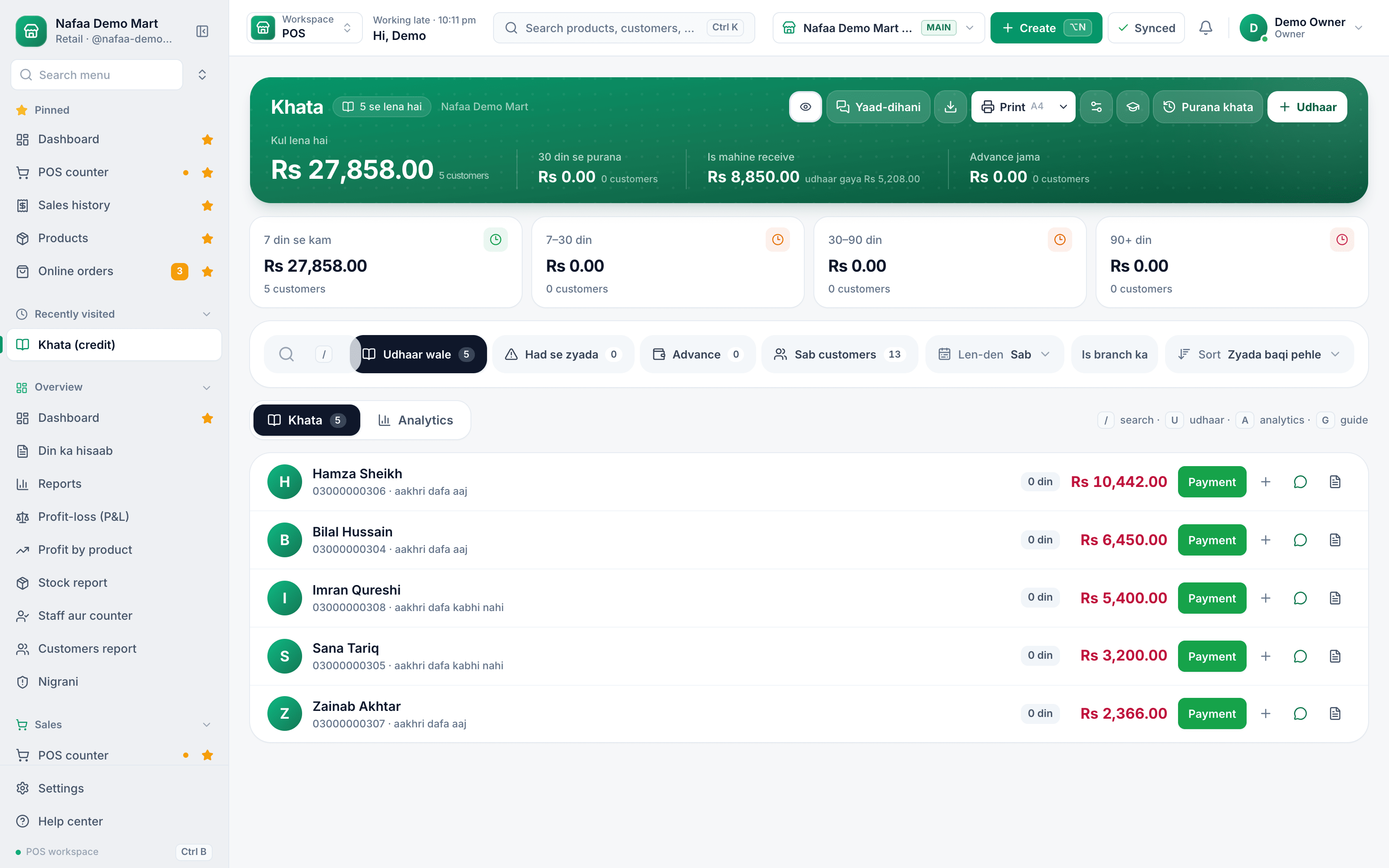
- Total to collect
- Balances by age
- Payment or reminder
Switching from DigiKhata
Step 1: Download each balance
Save the party ledger reports as PDF so you have a record of every balance on the day you switch.
Step 2: Add customers with opening balances
Enter each customer and what they owe today. Set credit limits for regulars.
Step 3: Import products
Upload your product list from Excel with cost, price and stock.
Step 4: Bill everything in Nafaa
From day one, every sale and udhaar goes through the counter.
Step 5: Keep DigiKhata for look-ups
Leave the old app installed for a month to answer questions about old entries.
Common questions
Can I move my DigiKhata balances to Nafaa?
Yes. Enter each customer in Nafaa with the balance they owe on the day you switch, as an opening balance. Keep DigiKhata's PDF ledger reports as your record of the history. From then on, every new udhaar is recorded from the bill in Nafaa.
Is there a free DigiKhata alternative?
Nafaa is not free; paid plans start at Rs 1,500 a month after a 7-day free trial. If you need a free tool and your work is mostly ledger entries, DigiKhata itself or a paper register may suit you better. See our khata apps comparison.
Does Nafaa send udhaar reminders like DigiKhata?
Yes. The khata groups balances by age and sends WhatsApp reminders with the amount due, starting with the oldest. The difference is that each balance comes straight from the bills, so the customer can see which items and dates the amount is for, which settles most arguments.
More comparisons
- Compare
Nafaa vs Tally
Nafaa is counter-first software for Pakistani businesses: POS billing, stock, khata and reports. TallyPrime is business management software built around accounting, inventory and tax filing. This page compares them fairly, says when Tally is the better choice, and shows how the two can work together.
- Compare
Nafaa vs Excel
Many shops start with a spreadsheet, and Excel is a very good one. This page compares running a shop in Excel with running it in Nafaa: billing at the counter, stock that updates on each sale, udhaar, several staff and backups. It says honestly when a spreadsheet is enough, and shows how to bring your Excel lists into Nafaa.
- Compare
Nafaa vs Udhaar Book
Udhaar Book, which its App Store listing says is now called Rupin, is a free khata, cash book and payments app with a business wallet, mobile load and bill payments. Nafaa is a POS-first system for running a counter, stock and udhaar together. This page compares them and says when Udhaar Book is the better pick.
- Compare
Nafaa vs Loyverse
Loyverse is a free POS used worldwide, with paid add-ons for longer sales history, employee management and advanced inventory. Nafaa is a paid POS built for Pakistan, with khata, JazzCash and Easypaisa, rupee pricing and purchasing in the product. This page compares them for a Pakistani shop and says plainly when Loyverse is the better choice.
- Compare
Nafaa vs Oscar POS
Oscar is a Pakistani POS for restaurants, retail, grocery, salons, pharmacies and more, with its own card device, a wallet, online ordering and accounting. Nafaa is a POS for the same kinds of business, with udhaar and offline billing at its core. This page compares the two from their own pages and says where Oscar fits better.
- Compare
Nafaa vs CORN POS
CORN POS is a restaurant POS from Pakistan with kitchen displays, tableside ordering, a rider app, branded online ordering and franchise tools, priced per branch in dollars. Nafaa is one system for shops and restaurants alike, priced in rupees. This page compares them for a restaurant or cafe and says where CORN POS is the stronger fit.