Product tour
See Nafaa at work, one screen at a time
Real screens from a demo grocery store, in the order a working day runs: from the first bill to the profit at closing time. Use Next and Back, the arrow keys, or swipe on a phone.
11 steps · about 2 minutes
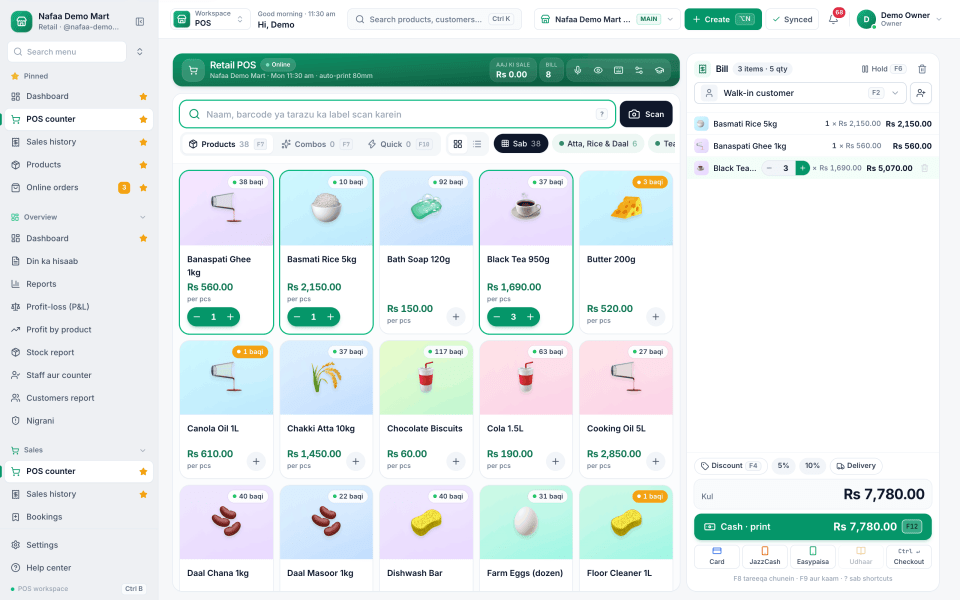
Make a bill at the counter
Tap a product or search for it. Each item lands on the bill with its price, and the total updates as you go.
Tip: use the ← → keys
Every step of the tour
The same steps in short, if you prefer to read.
Make a bill at the counter
Tap a product or search for it. Each item lands on the bill with its price, and the total updates as you go.
Show this step: Make a bill at the counterScan a barcode or type a name
Scan with a barcode scanner or the camera, or type a few letters of the name. Change the quantity with + and − on each line.
Show this step: Scan a barcode or type a nameTake payment the way the customer pays
Cash, JazzCash, Easypaisa, card or bank. The keypad works out the change, and split payment handles a bill paid two ways.
Show this step: Take payment the way the customer paysSell on udhaar in one tap
Pick the customer and choose Udhaar. The whole bill goes to their khata, and the receipt prints the old and the new balance.
Show this step: Sell on udhaar in one tapSee who owes you, and since when
The khata shows the total to collect, split by age: under 7 days, 7 to 30, 30 to 90 and over 90 days. Record a payment from the same list.
Show this step: See who owes you, and since whenSend a polite reminder on WhatsApp
Choose a soft, firm or final tone. Nafaa writes the message with the amount due and opens WhatsApp so you can send it.
Show this step: Send a polite reminder on WhatsAppKnow what is running low
Every sale takes stock down. Each product shows its price, cost, margin and how many are left, and low items are flagged at the top.
Show this step: Know what is running lowReorder before you run out
The low stock list shows how fast each item sells, how many days it will last and how much to order from which supplier.
Show this step: Reorder before you run outClose the day with the full picture
The day report shows net sale, money received, profit, the cash that should be in the drawer, discounts, returns and udhaar given.
Show this step: Close the day with the full pictureSee the real profit on every item
Profit by product lists sale, cost, profit and margin for each item, with gross profit and net profit after expenses.
Show this step: See the real profit on every itemCheck your business from your phone
See today’s sale, bills and udhaar given from anywhere. Nafaa has apps for Android and iPhone.
Show this step: Check your business from your phone
Try it with your own shop
Add your products, make your first bill and see your own day report. Free for 7 days, every feature open.